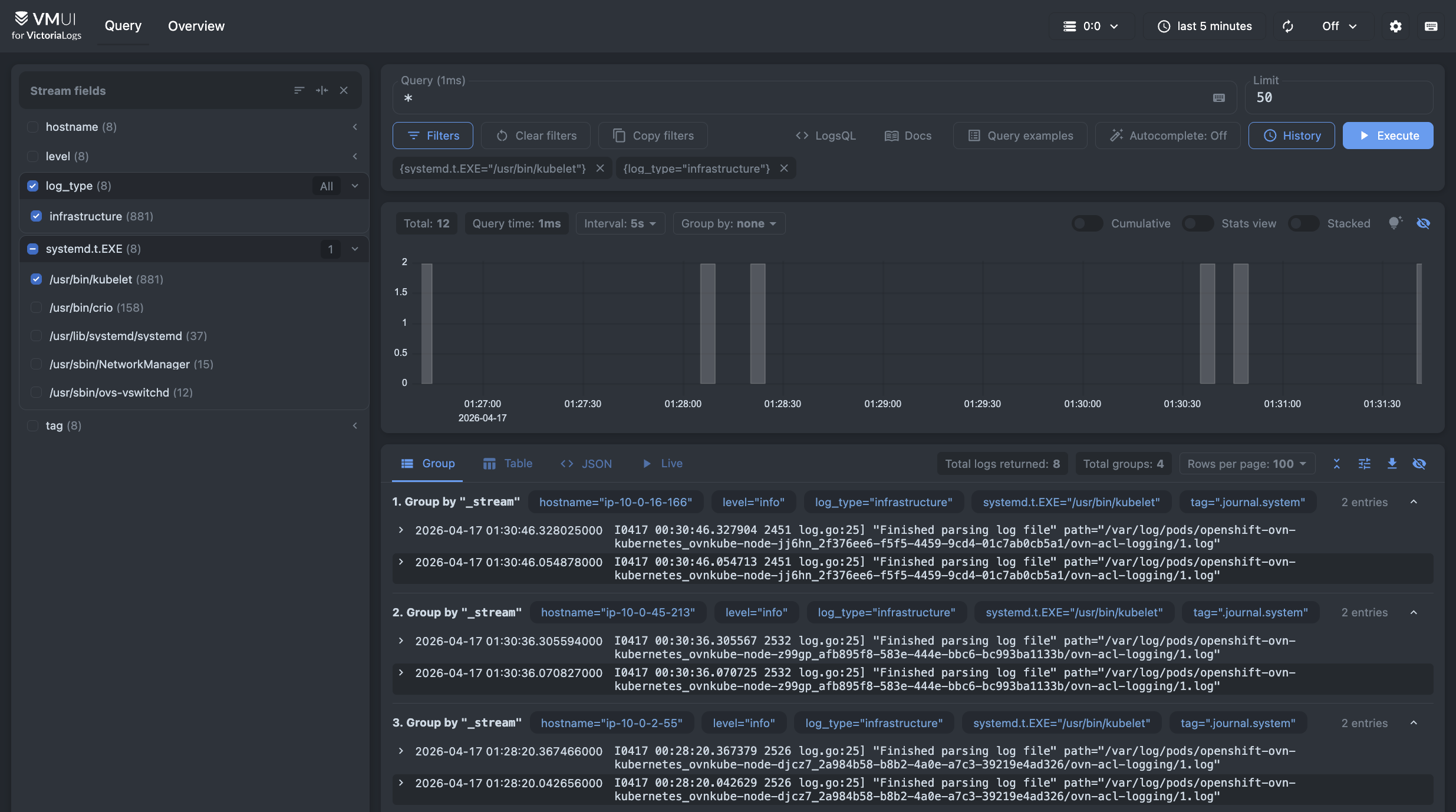
This guide explains how to collect and store logs from an OpenShift cluster in VictoriaLogs.
Pre-Requirements #
- OpenShift cluster
- Admin access to OpenShift cluster
- kubectl or oc installed and configured to access OpenShift cluster
- Helm installed
You can replace every kubectl command in this guide with oc. They are interchangeable in most cases on OpenShift clusters.
Overview #
To collect OpenShift logs, we’re going to:
- Install VictoriaLogs in the OpenShift Cluster
- Configure a service account to access the logs
- Install the OpenShift Logging operator
- Configure a Log Forwarder
- Test log ingestion in VictoriaLogs
Install VictoriaLogs #
Run the following command to add the VictoriaMetrics Helm repository :
      helm repo add vm https://victoriametrics.github.io/helm-charts/
helm repo update
To verify that everything is set up correctly, you may run this command:
helm search repo vm/
You should get a list similar to this:
      NAME                                    CHART VERSION   APP VERSION     DESCRIPTION
vm/victoria-logs-agent                  0.1.1           v1.50.0         VictoriaLogs Agent - accepts logs from various ...
vm/victoria-logs-collector              0.3.1           v1.50.0         VictoriaLogs Collector - collects logs from Kub...
vm/victoria-logs-single                 0.12.2          v1.50.0         The VictoriaLogs single Helm chart deploys Vict...
...
Create a minimal configuration file to run VictoriaLogs in OpenShift:
      cat <<EOF >vl-values.yml
securityContext:
  enabled: true
  allowPrivilegeEscalation: false
  capabilities:
    drop:
      - ALL
  readOnlyRootFilesystem: true

podSecurityContext:
  enabled: true
  runAsNonRoot: true
EOF
Note that, depending on the OpenShift cluster configuration, additional security settings might be required.
Create a namespace for VictoriaLogs called vl:
kubectl create namespace vl
Install VictoriaLogs with the following command:
helm upgrade --namespace vl --install vl vm/victoria-logs-single -f vl-values.yml
You should see a message like this:
      Release "vl" does not exist. Installing it now.
NAME: vl
LAST DEPLOYED: Fri Apr 17 01:05:42 2026
NAMESPACE: vl
STATUS: deployed
REVISION: 1
DESCRIPTION: Install complete
TEST SUITE: None
NOTES:
The VictoriaLogs write api can be accessed via port 9428 on the following DNS name from within your cluster:
    vl-victoria-logs-single-server-0.vl-victoria-logs-single-server.vl.svc.cluster.local.

Logs Ingestion:
  Get the VictoriaLogs service URL by running these commands in the same shell:
    kubectl --namespace vl port-forward svc/vl-victoria-logs-single-server 9428:9428
    echo http://localhost:9428

  Write URL inside the kubernetes cluster:
    http://vl-victoria-logs-single-server.vl.svc.cluster.local.:9428<protocol-specific-write-endpoint>

  See the documentation for log ingestion and supported write endpoints at https://docs.victoriametrics.com/victorialogs/data-ingestion/.

Read Data:
  The following URL can be used to query data:
    http://vl-victoria-logs-single-server.vl.svc.cluster.local.:9428

  See the documentation for log querying UI at https://docs.victoriametrics.com/victorialogs/querying/#web-ui or HTTP API at https://docs.victoriametrics.com/victorialogs/querying/#http-api
Note the “Write URL” value as you’ll need it later. In the example above, the value is:
http://vl-victoria-logs-single-server.vl.svc.cluster.local.:9428
RBAC Configuration #
Create a service account and cluster role binding for the service account to collect and forward the logs.
OpenShift provides separate ClusterRoles for monitoring of different types of logs: audit, infrastructure, and application.
Create a file to configure the service account and cluster role bindings:
      cat <<EOF >vl-rbac.yml
kind: ServiceAccount
apiVersion: v1
metadata:
  name: victorialogs
  namespace: openshift-logging
---
kind: ClusterRoleBinding
apiVersion: rbac.authorization.k8s.io/v1
metadata:
  name: vl-collect-infra
subjects:
  - kind: ServiceAccount
    name: victorialogs
    namespace: openshift-logging
roleRef:
  apiGroup: rbac.authorization.k8s.io
  kind: ClusterRole
  name: collect-infrastructure-logs
---
kind: ClusterRoleBinding
apiVersion: rbac.authorization.k8s.io/v1
metadata:
  name: vl-collect-audit
subjects:
  - kind: ServiceAccount
    name: victorialogs
    namespace: openshift-logging
roleRef:
  apiGroup: rbac.authorization.k8s.io
  kind: ClusterRole
  name: collect-audit-logs
---
kind: ClusterRoleBinding
apiVersion: rbac.authorization.k8s.io/v1
metadata:
  name: vl-collect-application
subjects:
  - kind: ServiceAccount
    name: victorialogs
    namespace: openshift-logging
roleRef:
  apiGroup: rbac.authorization.k8s.io
  kind: ClusterRole
  name: collect-application-logs
Install the roles in OpenShift with:
kubectl apply -f vl-rbac.yml
Alternatively, you can use the OpenShift web console to create the service account and cluster role binding. To do this:
- Navigate to ServiceAccounts.
- Click on Create Service Account.
- Fill in the name
victorialogsand namespaceopenshift-logging. - Click on Create.
- Navigate to RoleBindings.
- Create a binding for each
ClusterRolefor subjectvictorialogsinopenshift-loggingnamespace.
Install Red Hat OpenShift Logging operator #
The Cluster logging operator is a logging solution to support aggregated cluster logging. It is using Vector for log collection and shipping to remote storage.
To install the operator:
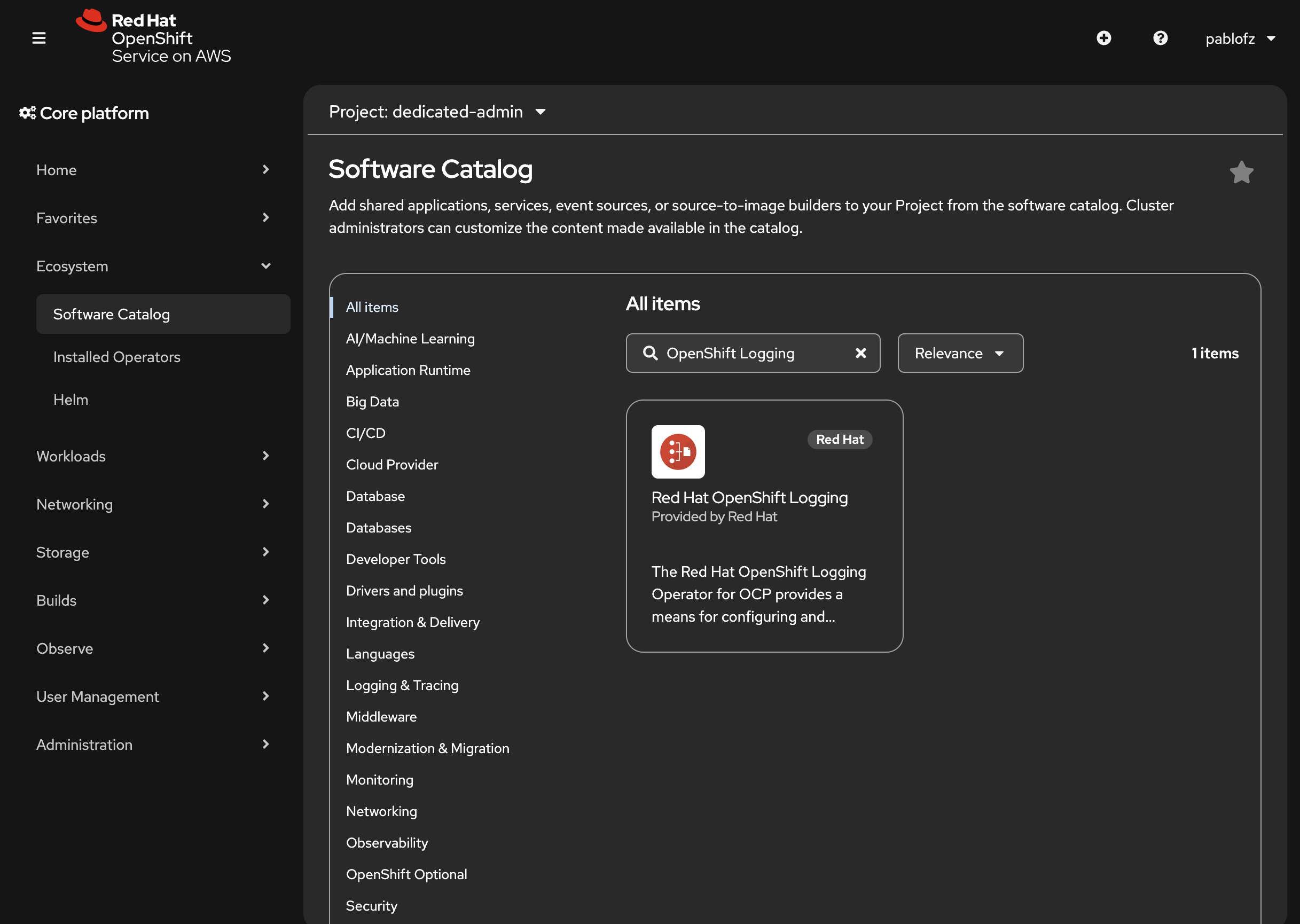
- Navigate to Ecosystem > Software Catalog
- Search for “OpenShift Logging” and select the operator.
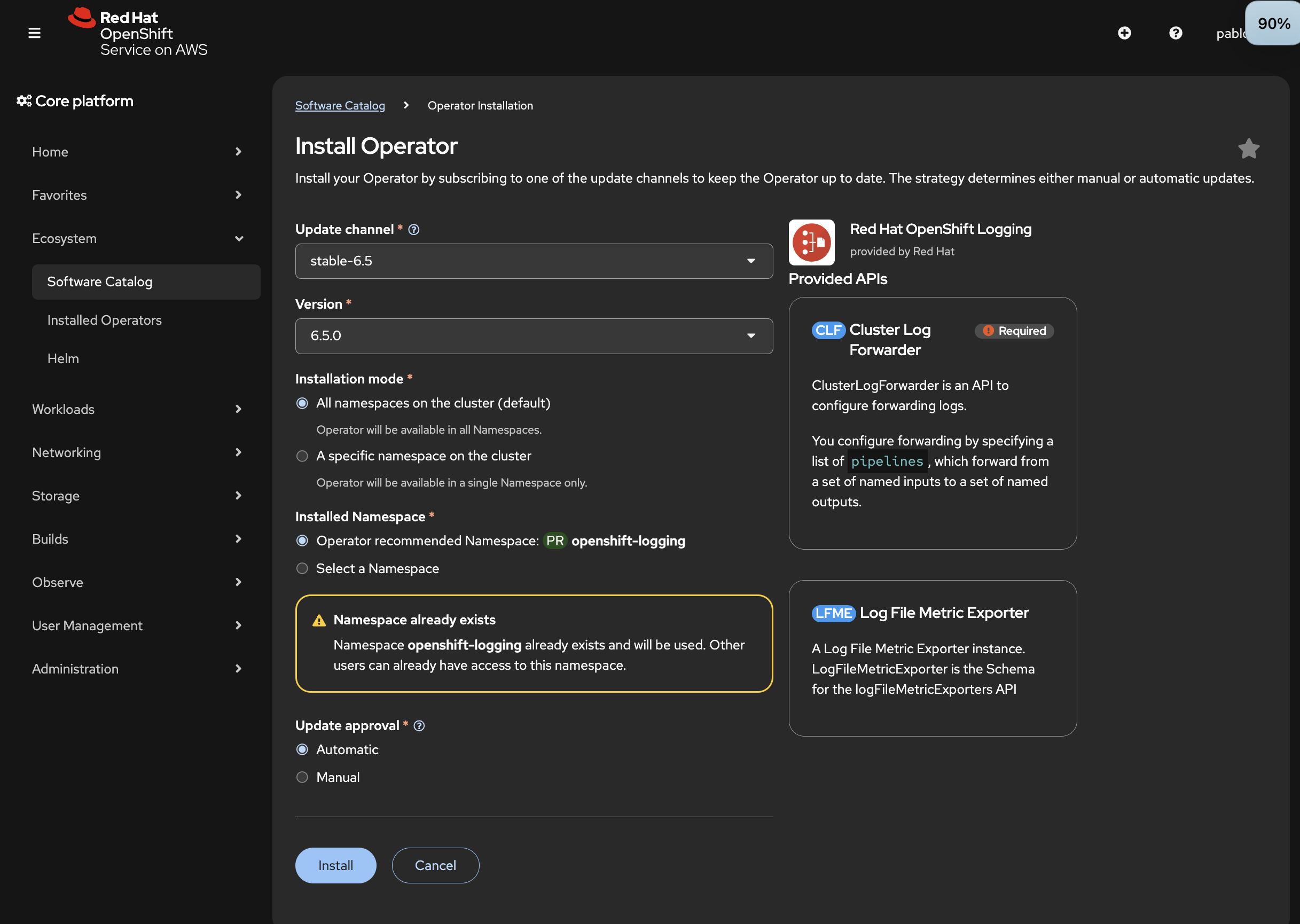
- Press Install.
- Confirm the settings and press Install again.
Configure logs forwarding #
We need to create a ClusterLogForwarder resource to forward logs from the OpenShift Logging operator to VictoriaLogs.
Run the following command to create the resource file:
      cat <<EOF > vl-forwarder.yml
apiVersion: observability.openshift.io/v1
kind: ClusterLogForwarder
metadata:
  name: logging
  namespace: openshift-logging
spec:
  managementState: Managed
  outputs:
    - elasticsearch:
        index: logs
        url: "http://vl-victoria-logs-single-server.vl.svc.cluster.local:9428/insert/elasticsearch/_bulk?_stream_fields=log_type,hostname,stream,kubernetes.pod_name,kubernetes.container_name,kubernetes.pod_namespace&_time_field=@timestamp&_msg_field=message,msg,_msg,log.msg,log.message,log&fake_field=1"
        version: 8
        tuning:
          compression: gzip
      name: victorialogs
      type: elasticsearch
    - elasticsearch:
        index: logs
        url: "http://vl-victoria-logs-single-server.vl.svc.cluster.local:9428/insert/elasticsearch/_bulk?_stream_fields=log_type,hostname,annotations.authorization.k8s.io/decision,hostname,verb&_time_field=@timestamp&_msg_field=annotations.authorization.k8s.io/reason&fake_field=1"
        version: 8
        tuning:
          compression: gzip
      name: victorialogs-audit
      type: elasticsearch
    - elasticsearch:
        index: logs
        url: "http://vl-victoria-logs-single-server.vl.svc.cluster.local:9428/insert/elasticsearch/_bulk?_stream_fields=log_type,hostname,tag,systemd.t.EXE,level&_time_field=@timestamp&_msg_field=message,msg,_msg,log.msg,log.message,log&fake_field=1"
        version: 8
        tuning:
          compression: gzip
      name: victorialogs-infrastructure
      type: elasticsearch
  pipelines:
    - inputRefs:
        - application
      name: application
      outputRefs:
        - victorialogs
    - inputRefs:
        - infrastructure
      name: infrastructure
      outputRefs:
        - victorialogs-infrastructure
    - inputRefs:
        - audit
      name: audit
      outputRefs:
        - victorialogs-audit
  serviceAccount:
    name: victorialogs
EOF
Then install the resource with:
kubectl apply -f vl-forwarder.yml
Alternatively, you can configure log forwarding in the OpenShift web console. To do this:
- Navigate to Operators tab
- Click on Installed Operators.
- Find Red Hat OpenShift Logging
- Navigate to ClusterLogForwarders.
- Click on Create ClusterLogForwarder.
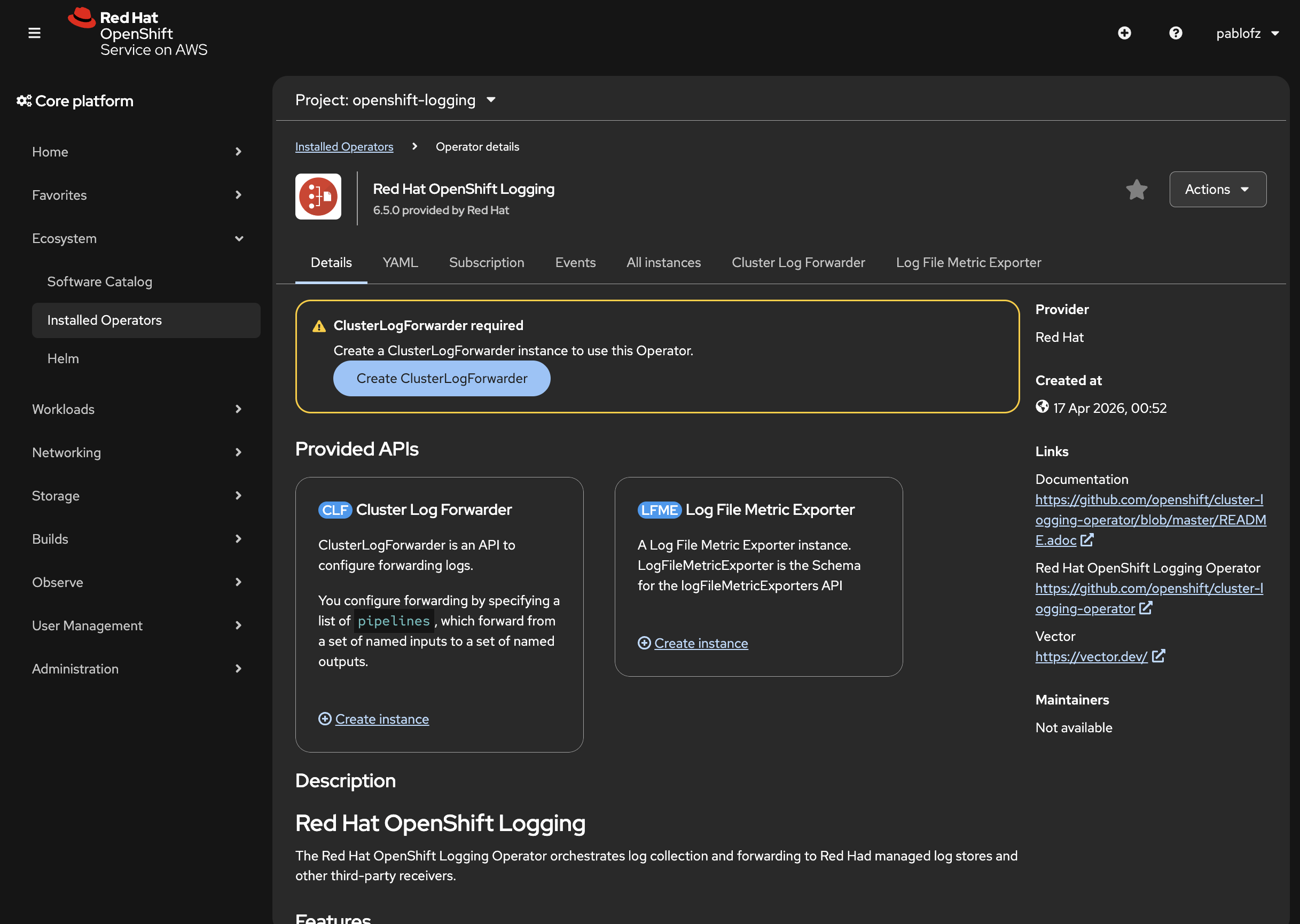
- Use the form to configure each type of forwarder.
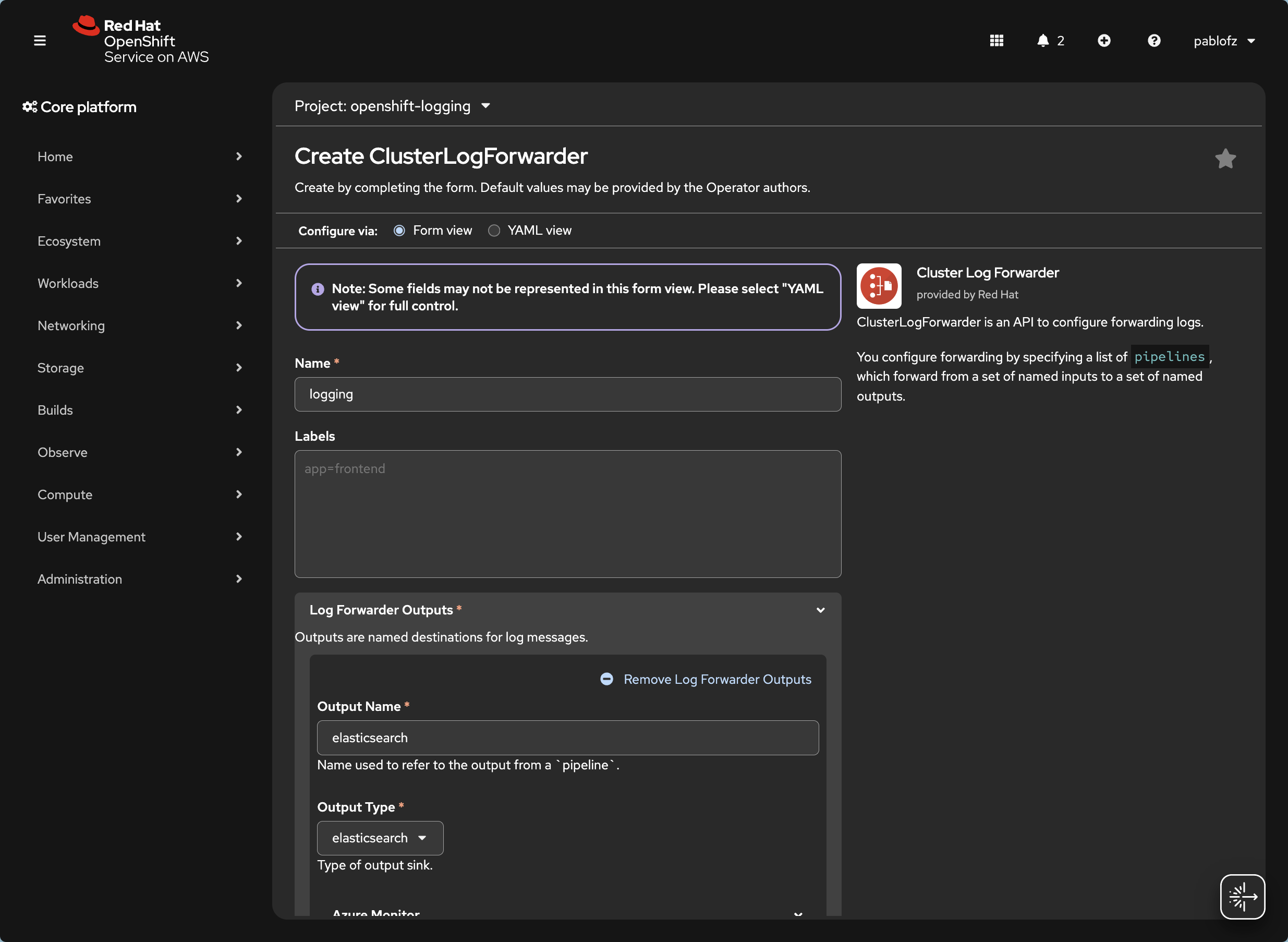
- Click Create
Verify logs ingestion #
We can verify that logs are being collected using the VictoriaLogs VMUI.
First, find the service name for the VMUI with:
kubectl get svc -n vl -l app.kubernetes.io/instance=vl
You should get a result similar to this. Note the name of the service:
      NAME                             TYPE        CLUSTER-IP   EXTERNAL-IP   PORT(S)    AGE
vl-victoria-logs-single-server   ClusterIP   None         <none>        9428/TCP   113s
Then, port-forward the VMUI service console with:
kubectl -n vl port-forward svc/vl-victoria-logs-single-server 9428:9428
Open your browser in http://localhost:9428/select/vmui/#/overview and verify that logs are being collected. This overview page shows the number of log entries being consumed in real time.
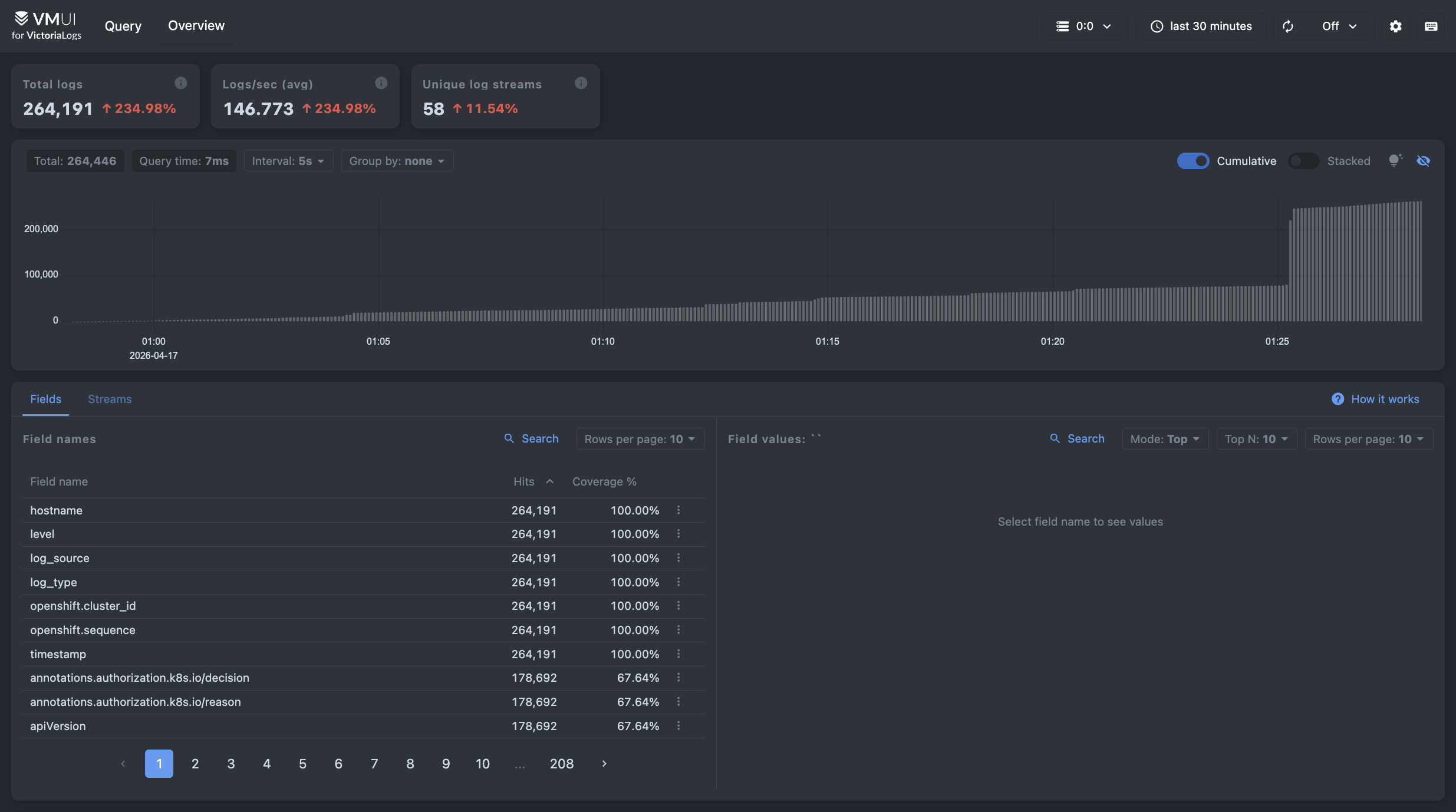
You can query your logs in the Query tab, found in http://localhost:9428/select/vmui.
You can filter streams on the left side pane to filter logs and use
LogsQL
to search for entries. Note that logs will have log_type attached to them to distinguish between different types of logs.