Matching Architecture to Risk #
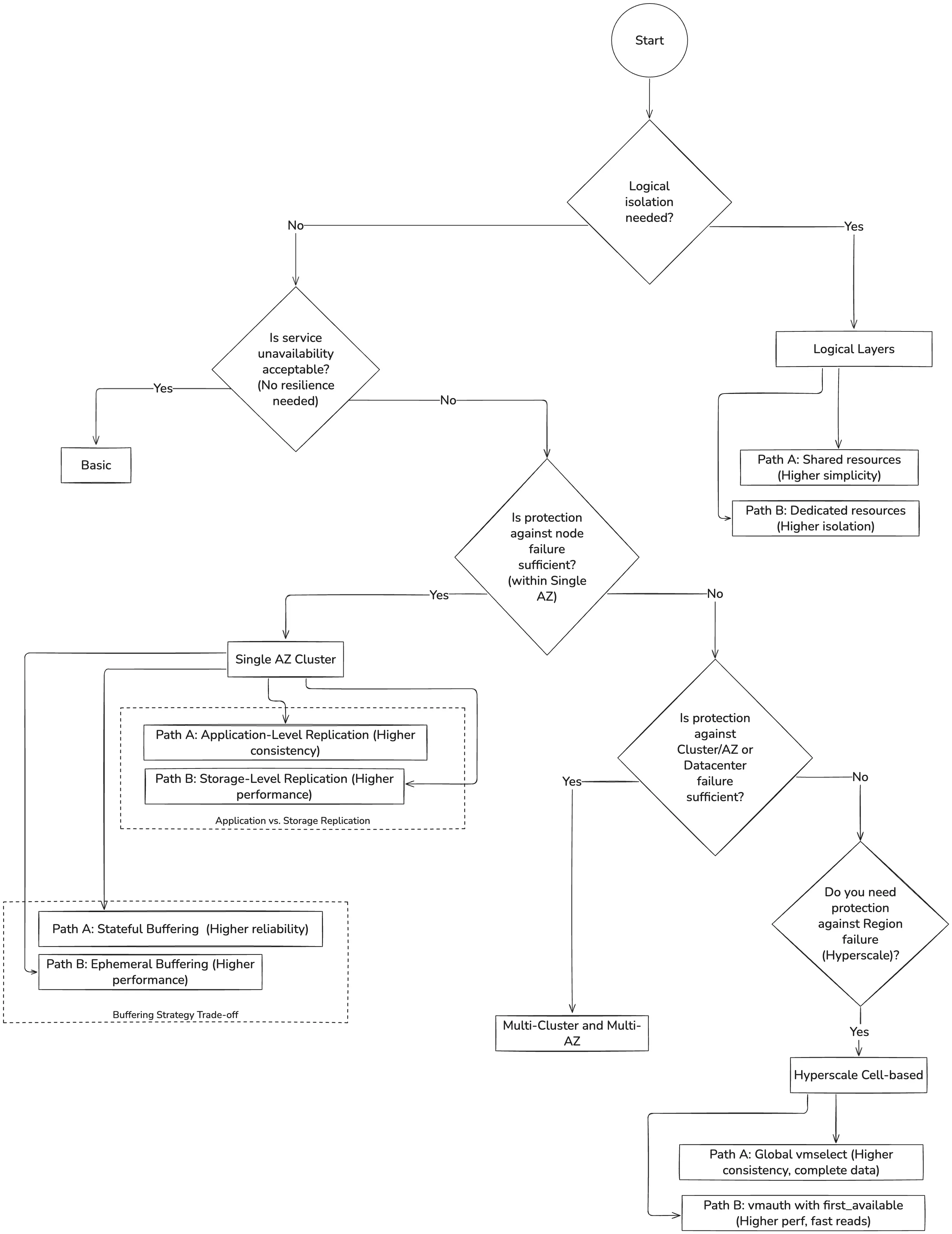
The complexity of any monitoring system is not an end in itself. It is a direct response to two questions: what risks are we protecting against, and how much performance do we need? This guide is designed to help you choose an architecture that precisely matches your answers.
Availability as a Guarantee Against Risk #
It’s a common mistake to think of availability as a simple number. In reality, availability is a guarantee against a specific level of risk. For example, 99.9% (“three nines”) availability allows for about 44 minutes of downtime per month. Before chasing higher nines, ask yourself: is this level of downtime acceptable for your defined risks? Remember that each additional ’nine’ of availability often comes with an exponential increase in both system complexity and operational cost.
The scope of the failure you are designing for is your “blast radius”. Before choosing an architecture, you must first define the blast radius you need to withstand.
Resilience and Scalability #
It is also crucial to distinguish between two fundamental goals:
- Resilience (or Availability) is about surviving failures. We achieve it by creating copies ( replicas ) of our components and data.
- Scalability (or Performance) is about handling load. We achieve it by adding more components on every layer to distribute the work.
The architectures in this guide are simply different combinations of these two approaches, designed to handle a specific blast radius.
Architectures as Answers to Blast Radius #
Each subsequent section of this guide presents an architecture designed to handle a specific blast radius, moving from the most straightforward setup to the most resilient.
- Basic (No Resilience). This architecture is the baseline for non-critical systems. It has no fault tolerance, and its blast radius is the instance itself. Any failure leads to a complete outage.
- Single AZ Cluster (Node-Level Resilience). This architecture protects against the failure of individual servers (nodes) or application instances within a single Availability Zone. However, its blast radius is the entire AZ; it will not survive a datacenter-wide outage.
- Multi-Cluster and Multi-AZ (Cluster/AZ/Datacenter-Level Resilience). Designed as a disaster recovery solution, this architecture can withstand the complete failure of an entire availability zone or data center.
- Logical Layers (Logical Resilience). This is not a physical resilience level but an architectural layer on top of any setup. It addresses the risk of data access conflicts by providing strong logical isolation between different teams or customers.
The decision tree #
Basic #
Recommended for: Pet projects, development/test stages, and non-critical systems monitoring.
Installation guide reference: VictoriaMetrics Single
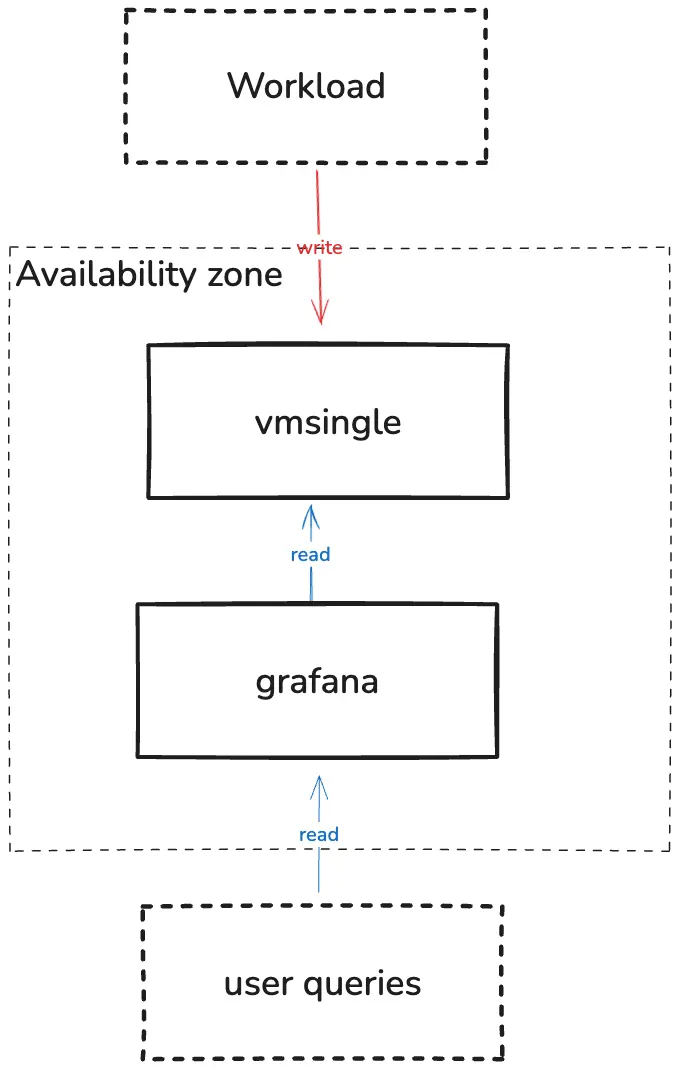
Key characteristics: Single instance that does everything: stores, retrieves, and provides metrics.
Pros:
- Straightforward. Quick deployment without additional components
- Cost-efficient. It avoids redundant work, such as writing or transmitting the same data twice, thereby reducing both computational and network expenses. Additionally, there are no extra copies of data.
Cons:
- Single point of failure. No fault tolerance and no availability
Schema:
Unavailability Scenarios #
In this simplest setup, any single-node failure leads to temporary data unavailability or loss until the instance restarts or storage is restored. There are no built-in redundancy or replication layers.
For this section, you can increase availability by utilizing backup and restore mechanisms on various levels: hardware, virtualization, persistence volume management, or application. VictoriaMetrics provides the backup tools to achieve that.
Single Availability Zone #
Recommended for: Single availability zone hosted systems of any scale
Installation guide reference: VictoriaMetrics Cluster
High availability implementation: HA VictoriaMetrics Cluster
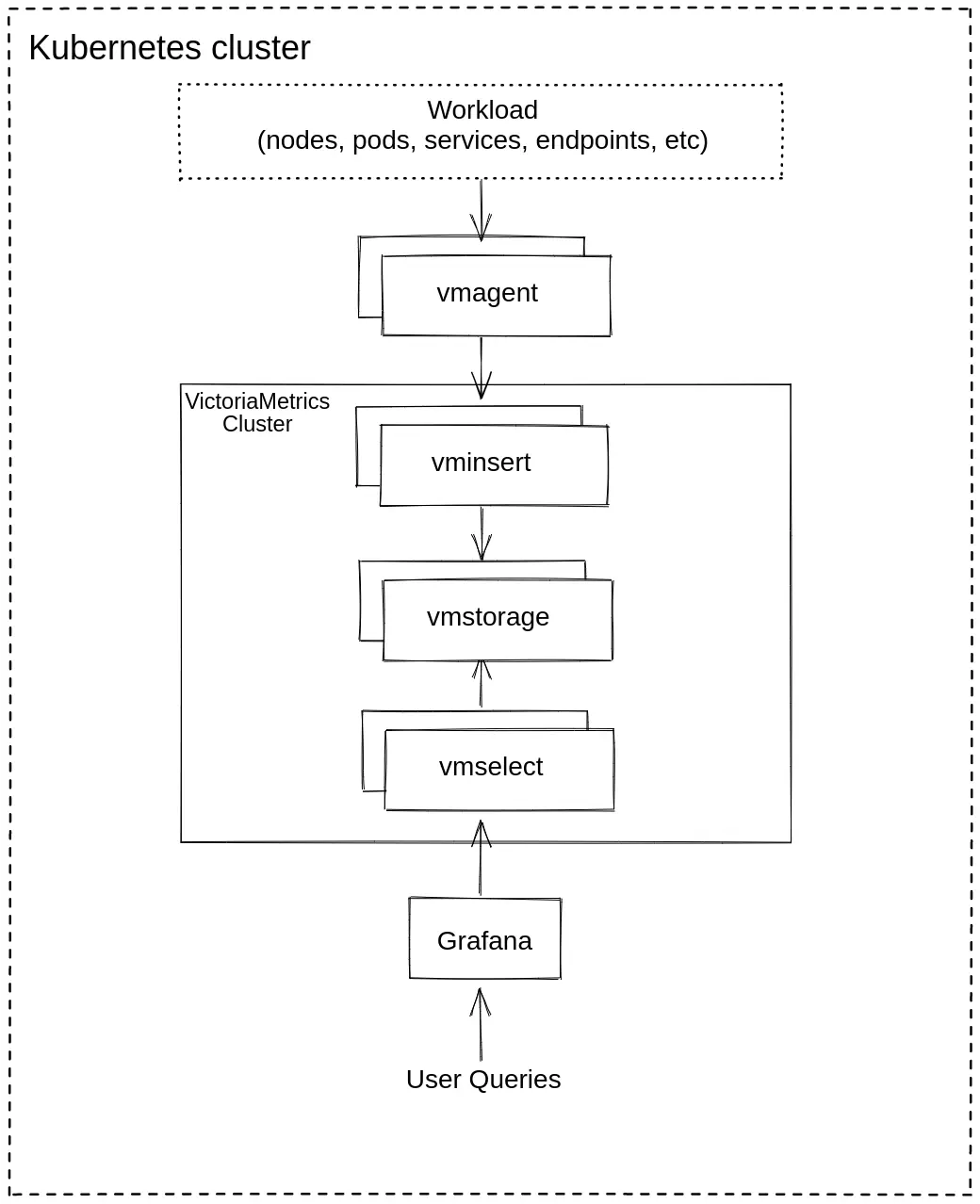
Key characteristics: This is a complete VictoriaMetrics cluster, commonly running in a single Kubernetes cluster. Each component of the cluster: vminsert, vmselect, and vmstorage has multiple copies (replicas). The data is also copied and sharded between vmstorage nodes using the --replicationFactor setting on vminsert.
See the official documentation
to determine the optimal replication factor for your needs.
Pros:
- Reliability. Ingestion and querying can continue while at least one instance of each component is available and the remaining instances can handle the load. With application-level replication, queries remain complete if the number of unavailable
vmstoragenodes is less than-replicationFactor.
Cons:
- No disaster recovery. If the entire Kubernetes cluster, availability zone, or data center fails, you lose the entire monitoring system.
- Increased Cost: Storage cost grows linearly with the replicationFactor (e.g., RF=2 equals 2x storage, RF=3 equals 3x). Compute components like vminsert or vmselect scale horizontally and increase throughput rather than duplicating data.
Schema:
Application vs. Storage Replication #
When building a resilient cluster, several replication options are available.
Path A: Application-Level Replication. This approach is enabled
by setting
-replicationFactor=N on both vminsert and vmselect, where N is the desired number of copies. vminsert writes N copies across different vmstorage nodes. Set -dedup.minScrapeInterval=1ms on vmselect so queries do not count these copies twice.
Pros:
- Guaranteed Query Completeness on Node Failure. The key advantage is that the cluster is aware of its replication. It can survive a complete vmstorage node failure and still guarantee 100% complete query responses from the remaining replicas (as long as the number of failed nodes is less than the replication factor).
- Infrastructure-Independent Logic. The replication logic is part of the VictoriaMetrics application, ensuring the same predictable behavior whether you run on-premise or on any cloud provider.
Cons:
- Higher resource usage. Application-level replication increases CPU, memory, disk space and network use by up to N times.
- Latency sensitivity risks. A slow or overloaded replica can increase write latency, since inserts must complete on multiple nodes. A larger number of nodes increases the risk of problems with one of them.
Path B: Storage-Level Replication (The Cloud Provider Way) In this model, VictoriaMetrics replication factor is set to 1, and the vmstorage data is backed up with cloud-provided and replicated volumes(i.e., AWS EBS replicated within AZ, Google Zonal PD).
Pros:
- Offloaded Resource Cost. The data replication is no longer bound by application CPU and network performance, and is offloaded to the cloud provider’s storage infrastructure.
Cons:
- No read resilience. Any vmstorage restart (including planned maintenance) or failure makes its data temporarily unavailable for querying.
- Failover duration. If
vmstorageis unavailable, data from that shard remains unavailable too untilvmstoragestarts on a healthy node with its PVC attached.
Query Consistency Partial vs. Complete Responses #
In a large, distributed system, partial failures are a common occurrence. A critical choice is how your read path should behave when only partial data can be retrieved.
Path A: Allow Partial Responses (Focus on Availability) By default, if a vmstorage node is down, vmselect will continue getting results from the healthy vmstorage nodes. If more than or equal to the replicationFactor vmstorage nodes fail to respond, the response will have the “isPartial” field set to true.
Pros:
- High Availability. Some data, albeit incomplete, would still be available. The system degrades gracefully. It will continue to return available data from the remaining healthy nodes, rather than failing the entire query.
Cons:
- Risk of incomplete data. Users might not realize the “partial” warning and make decisions based on incomplete and possibly misleading graphs.
Path B: Deny Partial Responses (Focus on Consistency) You can configure vmselect with the -search.denyPartialResponse flag. If vmselect cannot fetch a complete result from all vmstorage nodes that hold the requested data according to the replication factor value, it will return an error instead of a partial result.
Pros:
- Guaranteed data consistency. This approach ensures that any successful query returns 100% of the requested data. If vmselect receives only a partial response from its vmstorage nodes, the entire query is marked as failed, preventing any misleading or incomplete results.
Cons:
- Lower Availability. This approach sacrifices availability to guarantee consistency. If replicationFactor or more vmstorage nodes are unavailable, read queries return errors.
Buffering with vmagent #
When storage is temporarily unavailable, vmagent buffers compressed unsent data on the local filesystem. The size of the queue is controlled via --remoteWrite.maxDiskUsagePerURL and can be
estimated in advance
.
By default, the operator uses ephemeral storage for the vmagent queue. In production, we recommend explicitly configuring a PersistentVolumeClaim (PVC) for vmagent to ensure the buffer is stored on a persistent disk and survives pod restarts. See on-disk persistence .
Pros:
- Improved reliability. Unsent data is safe during vmagent restarts or when remote storage is down (until queue is full).
Cons:
- Requires additional resources. Deployment becomes stateful, uses disk space, and I/O. The queue size can build extra pressure on remote storage once it becomes available.
For Enterprise users, the queueing can be offloaded to an external message broker, such as Kafka. In that case vmagent can read or write into Kafka .
Unavailability Scenarios #
Blast radius: Cluster
- Instance/pod failure:
- Path A (Application-level replication, RF ≥2): no impact; cluster continues with remaining replicas.
- Path B (Storage-level replication, RF=1): temporary data unavailability.
- If vmagent uses a PersistentVolumeClaim, buffered data survives pod restarts and is replayed automatically.
- Node/server failure: pods rescheduled; impact depends on replication mode.
- AZ/datacenter failure: complete outage; no cross-AZ protection.
- vminsert or vmstorage unavailability:
vmagentreplays buffered data after reconnecting.
Multi-Cluster and Multi-AZ #
Recommended for: Large-scale workloads or services with high SLA requirements that must survive the complete failure of a datacenter or an Availability Zone (AZ).
High availability implementation: VictoriaMetrics Multi-Regional Setup
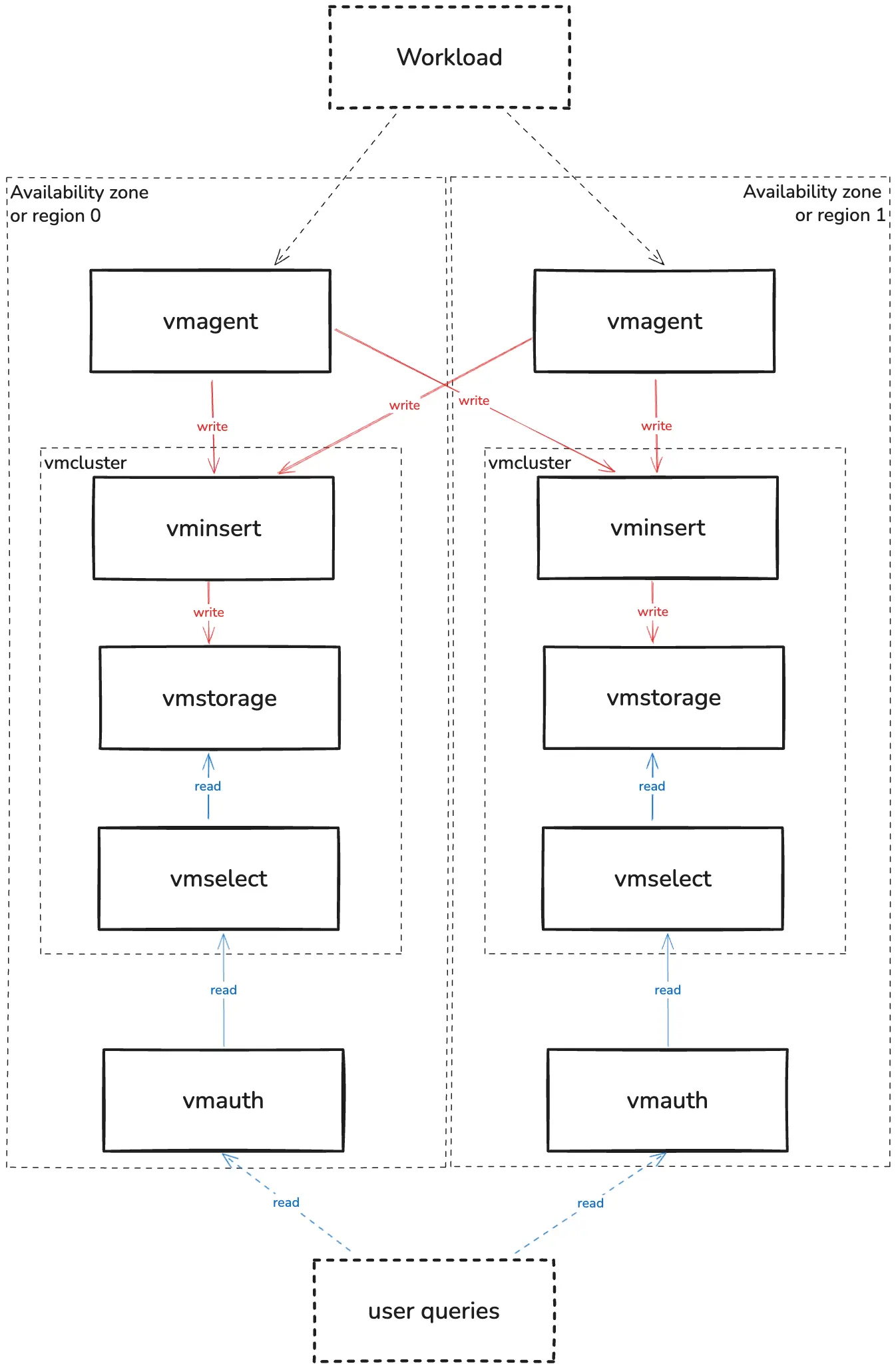
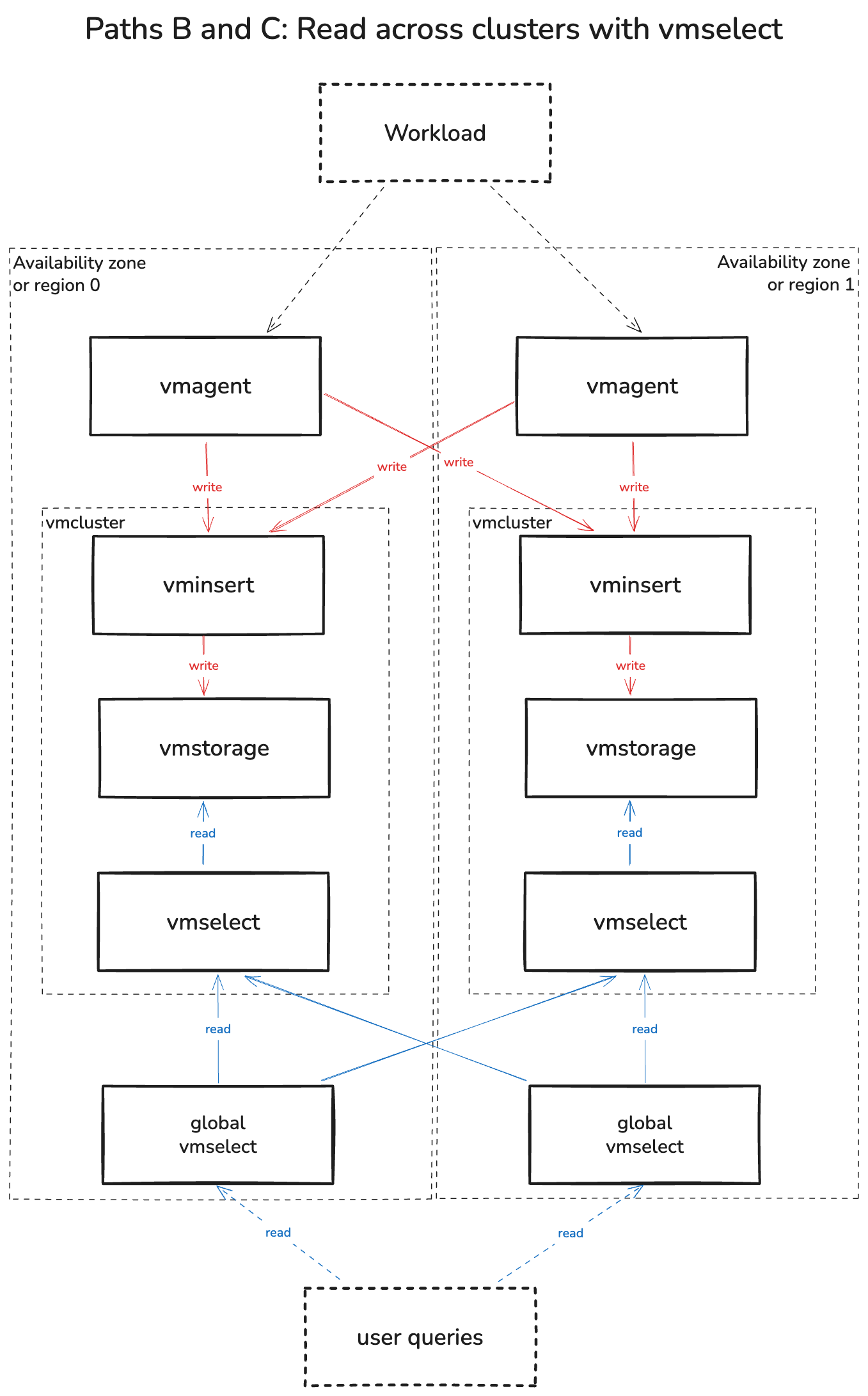
Key characteristics: The core principle of this architecture is to run two or more independent, self-contained VictoriaMetrics clusters (from the Single AZ section) in separate failure domains, such as different Availability Zones or geographic regions. A global layer is responsible for routing write and read traffic to these clusters. Each participating AZ must be provisioned to handle the entire workload if another AZ fails.
Each vmagent sends a full copy of its data to every cluster.
List all cluster write URLs in its -remoteWrite.url flags.
Each vmagent uses a separate write queue for each cluster.
If one cluster is slow or unavailable, vmagent buffers its writes and keeps sending data to the other clusters.
Pros:
- Disaster Recovery: The system can survive a complete failure of one cluster’s location (AZ or region).
- Isolation: Incidents, maintenance, or configuration errors in one cluster do not affect the others.
Cons:
- Increased Cost: You are paying more for the infrastructure (compute, storage, and network). Each cluster ingests and stores a full copy, so two clusters roughly double storage use and write traffic.
Schema:
Reading from multiple sources #
Path A: Read one cluster with vmauth. Each vmauth uses first_available to query the first available cluster in its url_prefix list.
Use the
high-availability configuration
with deny_partial_response=1 and matching retry_status_codes so vmauth tries another cluster
when the selected cluster cannot return a full response.
Pros:
- Lower traffic costs and latency. Reading one cluster reduces cross-AZ and cross-region traffic and can lower query latency.
- Lower query overhead.
vmauthdoes not merge results from multiple clusters.
Cons:
- Stale reads.
first_availablechecks whether a cluster is available, not whether it has received the latest data. If the queued bytes for a cluster grow invmagent_remotewrite_pending_data_bytes, remove that cluster from read routing until its queue drains.
Path B: Merge all responses with vmselect.
A global vmselect queries local vmselect instances in each cluster and merges their results.
Run each cluster’s local vmselect with -clusternativeListenAddr to accept queries from other vmselect instances.
Choose a TCP port and use it in the global vmselect configuration.
If vminsert writes multiple copies, set the same -replicationFactor on the local vmselect.
See
multi-level cluster setup
.
For two clusters holding full copies of the same data, use these flags on the global vmselect:
      -storageNode=vmselect-a:8401
-storageNode=vmselect-b:8401
-replicationFactor=2
-dedup.minScrapeInterval=1ms
-search.denyPartialResponse
This allows it to return full responses when one cluster is unavailable.
The remaining cluster must have all data needed for the query.
-search.denyPartialResponse returns an error when the remaining clusters cannot provide a full response.
For more clusters with full copies of the data, add one address per cluster and set -replicationFactor to the number of clusters.
Use
vmstorage groups
when a full copy of the data is split across several read endpoints.
Paths B and C query multiple clusters, which increases cross-AZ traffic and the work done by the global vmselect.
Pros:
- Data completeness. The global
vmselectcan fill gaps in one cluster’s data with another cluster’s copy.
Cons:
- Query latency. A slow cluster can delay the query or cause it to time out, even if another cluster has all the data.
Path C: Skip slow replicas with vmselect. Use the setup from Path B and enable -search.skipSlowReplicas on the global vmselect to stop waiting once enough replicas respond.
With two clusters and -replicationFactor=2, one full response is enough to return the query result without waiting for the other cluster.
Pros:
- Lower query latency. This can reduce query latency compared with waiting for all responses.
Cons:
- Stale reads. Recent data can be missing if the responding cluster lags behind on writes.
For Alerting choose one of two alerting setups:
- Local
vmalert. Runvmalertin each cluster and query its localvmselect. Rules can use stale data if writes to that cluster lag. - Global
vmalert. Use the same read entry point as users. Rule results depend on the selected read path.
Unavailability Scenarios #
Blast radius: Availability zone or region
Primary region failure (Active-Passive): If read failover is configured, queries can switch to the healthy region. The switching time depends on the routing and health checks.
Single AZ/cluster failure (Active-Active): A configured read path can use the surviving cluster. Read results may differ while
vmagentdelivery to one cluster lags.Cross-region link failure:
vmagentbuffers writes for the affected cluster up to its queue limit. It keeps sending writes to the other cluster. Queries to the affected cluster may miss recent data.
Logical layers #
Recommended for: Companies of any scale that need to serve multiple internal teams or external customers with separate data. Each tenant may have different requirements for data isolation and performance.
The other use case is a different retention across tenants, which is described in this guide: VictoriaMetrics Cluster
Key characteristics: This architecture introduces a logical layer of multitenancy on top of the physical architectures mentioned before.
- The main goal is to serve multiple tenants (datasets) on the same shared infrastructure while providing strong logical isolation. This solves the problem of ensuring that Team A cannot view data from Team B.
- This is achieved using VictoriaMetrics multitenancy . Each tenant is assigned a unique AccountID.
- This AccountID identifies the tenant’s data from ingestion to querying.
How it works:
- At the vmagent: A vmagent receives data from all sources. When sending data to
vminsert, it uses a tenant-specific URL or the multitenant endpoint with avm_account_idlabel. - At the vminsert and vmstorage: These components natively separate data based on the tenant ID. The data from one tenant is logically isolated from another tenant.
- At the vmauth and vmselect: Configure
vmauthto route each user to their tenant’s query URL. Do not exposevmselectto untrusted users. Its multitenant endpoints can read data across tenants.
Architectural Models for the isolation #
This multitenancy approach gives us another trade-off in the isolation implementation.
Schema:
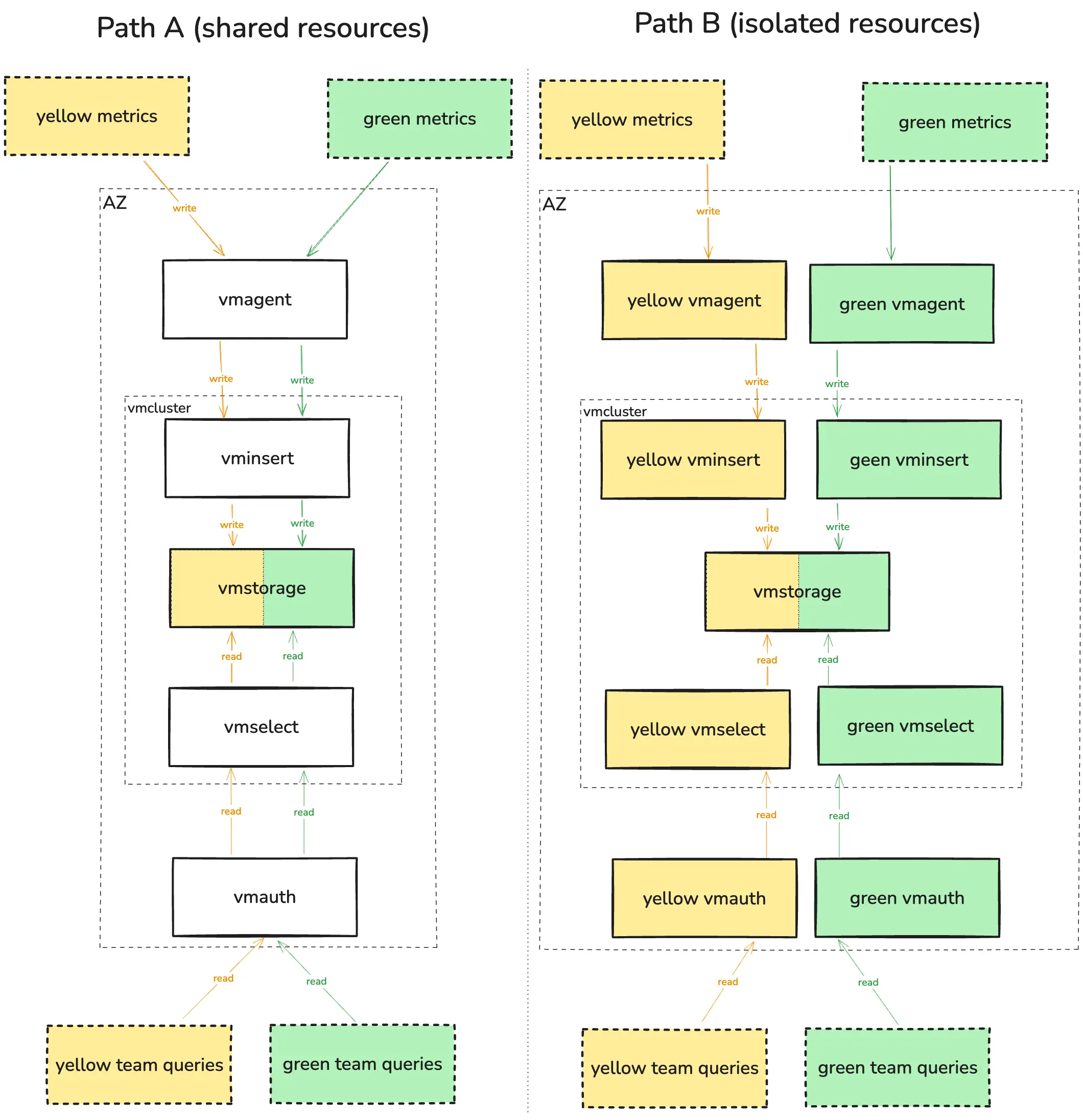
Path A: Shared resources. We have a single, shared pool of all cluster components.
Pros:
- Resource efficient. This is the cheapest way to run the ingestion layer.
Cons:
- Noisy Neighbor Problem. There is no performance isolation at the entry point. A single tenant sending too much data can slow down ingestion for everyone else.
Path B: Dedicated processing layer. For very important tenants, we can create a separate, dedicated layer of vmagents, vmselect, vminsert, and other components in use.
Pros:
- Processing isolation. Important tenants have dedicated processing components, so other tenants do not use their capacity. In this diagram,
vmstorageremains shared.
Cons:
- More expensive and complex to manage multiple service pools.
Section below contains backward-compatible anchors for links that were moved or renamed.
The Hyperscale (Cell-based) #
This topology was removed as too complex for understanding and supporting. Its use case was limited to a rare combination of requirements that are typically not needed for most of the deployments.
Alerting Strategy Trade-offs #
This chapter was removed together with “Hyperscale” section. See above.
Path B: Focus on Read Speed (The vmauth with first_available mode) #
This chapter was removed together with “Hyperscale” section. See above.
Path A: Prioritize Data Completeness (The Global vmselect model) #
This chapter was removed together with “Hyperscale” section. See above.
Choosing Your Read Path Strategy #
This chapter was removed together with “Hyperscale” section. See above.