Cluster mode in VictoriaLogs provides horizontal scaling to many nodes when single-node VictoriaLogs reaches vertical scalability limits of a single host. If you have the ability to run a single-node VictoriaLogs on a host with more CPU / RAM / storage space / storage IO, then it is preferred to do this instead of switching to cluster mode, since a single-node VictoriaLogs instance has the following advantages over cluster mode:
- It is easier to configure, manage and troubleshoot, since it consists of a single self-contained component.
- It provides better performance and capacity on the same hardware, since it doesn’t need to transfer data over the network between cluster components.
The migration path from a single-node VictoriaLogs to cluster mode is very easy - just add its’ TCP address to the list of vlstorage nodes
passed via -storageNode command-line flag to vlinsert and vlselect components of the cluster mode.
See
cluster architecture
for more details about VictoriaLogs cluster components.
See quick start guide on how to start working with VictoriaLogs cluster.
Architecture #
VictoriaLogs in cluster mode is composed of three main components: vlinsert, vlselect, and vlstorage.
See how these components fit together
for the big picture.
vlinsertaccepts logs via all supported protocols . It distributes (shards) incoming logs evenly across thevlstoragenodes specified in the-storageNodecommand-line flag.vlselectaccepts queries via all supported query endpoints . It executes the incoming queries in parallel across thevlstoragenodes specified in the-storageNodecommand-line flag, merges query results received from thevlstoragenodes and returns the response to the client.vlstorageperforms two key roles:- It stores logs received from
vlinsertat the directory defined by the-storageDataPathflag. See storage configuration docs for details. - It executes queries received from
vlselectand returns the query results tovlselectfor further processing.
- It stores logs received from
All the cluster components - vlinsert, vlselect and vlstorage - share the same executable - single-node VictoriaLogs.
The executable converts to vlinsert and vlselect node if a comma-separated list of TCP addresses of vlstorage nodes is passed to the -storageNode command-line flag.
For example, the following command starts a node, which serves both vlinsert and vlselect requests and forwards them to vlstorage-1:9428 and vlstorage-2:9428 nodes:
./victoria-logs-prod -storageNode=vlstorage-1:9428,vlstorage-2:9428
If you want disabling the access to
insert APIs
, i.e. to run as a vlselect node only,
then pass -insert.disable command-line flag:
./victoria-logs-prod -storageNode=... -insert.disable
If you want disabling the access to
select APIs
, i.e. to run as a vlinsert node only,
then pass -select.disable command-line flag:
./victoria-logs-prod -storageNode=... -select.disable
It is recommended to run separate sets of vlinsert and vlselect nodes, so data ingestion workload doesn’t affect querying workload and vice versa.
If the -storageNode command-line flag isn’t passed to single-node VictoriaLogs, then it runs as a vlstorage, i.e. it accepts data from vlinsert nodes
and accepts queries from vlselect nodes. See
these docs
for details.
All the VictoriaLogs cluster components are horizontally scalable and can be deployed on hardware best suited for their respective workloads.
Communication between vlinsert / vlselect and vlstorage is done via HTTP over the port specified by the -httpListenAddr flag (9428 by default):
vlinsertsends data to the/internal/insertHTTP endpoint atvlstorage.vlselectsends queries to/internal/select/*HTTP endpoints atvlstorage.
This HTTP-based communication model allows using reverse proxies for authorization, routing, and encryption between components.
For advanced setups, refer to the multi-level cluster setup documentation.
High availability #
VictoriaLogs cluster provides high availability for
data ingestion path
.
It continues accepting incoming logs when some of the vlstorage nodes are temporarily unavailable.
vlinsert evenly spreads new logs among the remaining available vlstorage nodes in this case, so newly ingested logs are properly stored and are available for querying
without any delays. This allows performing maintenance tasks for vlstorage nodes (such as upgrades, configuration updates, etc.) without worrying about data loss.
Make sure that the remaining vlstorage nodes have enough capacity for the increased data ingestion workload, in order to avoid availability problems.
VictoriaLogs cluster returns 502 Bad Gateway errors for
incoming queries
if some of the vlstorage nodes are unavailable or expose an internal API version incompatible with vlselect. This guarantees consistent query responses
(e.g. all the stored logs are taken into account during the query) during maintenance tasks at vlstorage nodes. Note that all the newly incoming logs are properly stored
to the remaining vlstorage nodes - see the paragraph above, so they become available for querying immediately after all the vlstorage nodes return back to the cluster.
A version mismatch usually happens during a rolling upgrade, when some vlstorage nodes are upgraded while others aren’t.
The
release notes
list such incompatibilities, so check them before upgrading.
The errors stop after all the components are upgraded to compatible versions.
There are practical cases when it is preferred to return partial responses instead of 502 Bad Gateway errors if some of vlstorage nodes are unavailable.
See
these docs
on how to achieve this.
In most real-world cases, vlstorage nodes become unavailable during planned maintenance such as upgrades, config changes, or rolling restarts.
These are typically infrequent (weekly or monthly) and brief (a few minutes) events.
A short period of query downtime during maintenance tasks is acceptable and fits well within most SLAs. For example, 43 minutes of downtime per month during maintenance tasks
provides ~99.9% cluster availability. This is better in practice compared to “magic” HA schemes with opaque auto-recovery - if these schemes fail,
then it is impossible to debug and fix them in a timely manner, so this will likely result in a long outage, which violates SLAs.
The real HA scheme for both data ingestion and querying can be built only when copies of logs are sent into independent VictoriaLogs instances (or clusters) located in fully independent availability zones (datacenters).
If an AZ becomes unavailable, then new logs continue to be written to the remaining AZ, while queries return full responses from the remaining AZ. When the AZ becomes available, then the pending buffered logs can be written to it, so the AZ can be used for querying full responses. This HA scheme can be built with the help of vlagent for data replication and buffering, and vmauth for data querying:
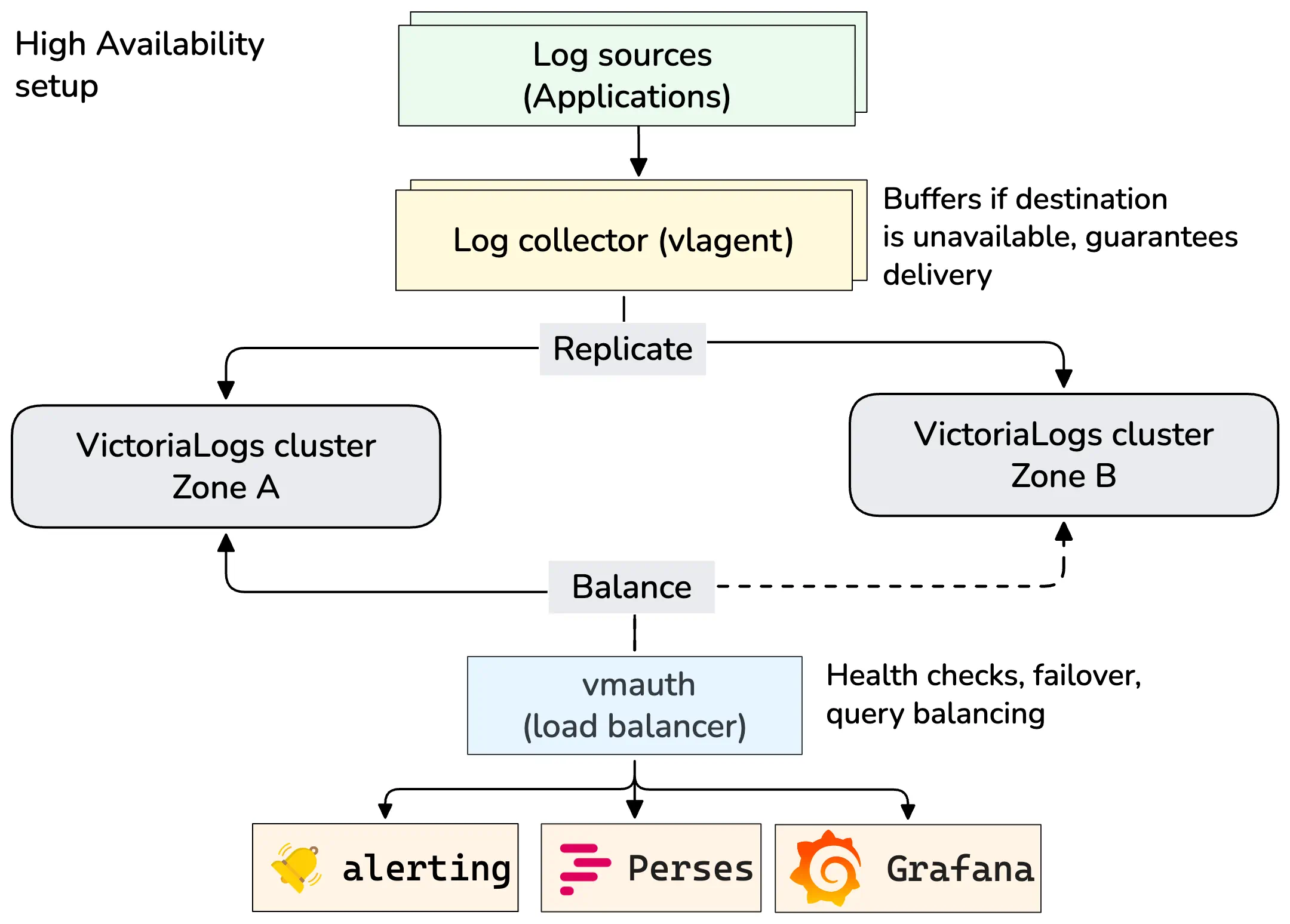
- vlagent
receives and replicates logs to two VictoriaLogs clusters.
If one cluster becomes unavailable, then the
vlagentcontinues sending logs to the remaining healthy cluster. It also buffers logs that cannot be delivered to the unavailable cluster. When the failed cluster becomes available again, thevlagentsends the buffered logs to it. After all the buffered logs are sent to the returned cluster, it can start serving queries. This is usually done manually by startingvlselectnodes in the cluster. - vmauth
routes query requests to healthy VictoriaLogs clusters.
If one cluster becomes unavailable,
vmauthdetects this and automatically redirects all query traffic to the remaining healthy cluster.
There is no magic coordination logic or consensus algorithms in this scheme. This simplifies managing and troubleshooting this HA scheme.
See also replication .
Replication #
vlinsert doesn’t replicate incoming logs among vlstorage nodes in
VictoriaLogs cluster
.
Instead, it spreads evenly (shards) incoming logs among vlstorage nodes specified in the -storageNode command-line flag.
This provides cost-efficient linear scalability for the cluster capacity, data ingestion performance and querying performance proportional to the number of vlstorage nodes.
It is recommended making regular backups for the data stored across all the vlstorage nodes in order to make sure that the data isn’t lost in case of any disaster
(such as accidental data removal because of incorrect config updates or incorrect upgrades, or physical corruption of the data on the persistent storage).
See
how to backup and restore data for VictoriaLogs - these docs apply to vlstorage nodes
.
If you need restoring the data between the backup time and the current time, then it is recommended building HA setup for VictoriaLogs cluster , so you could copy the needed per-day partitions from cluster replica.
Usually the disaster event occurs rarely (e.g. once per year). Every such event has unique preconditions and consequences, so it is impossible to automate recovering from disaster events. These events require human attention and carefully thought manual actions, so there is little practical sense in relying on automatic data recovery from the magically replicated data among storage nodes.
Single-node and cluster mode duality #
A single-node VictoriaLogs instance can be used as vlstorage node in
VictoriaLogs cluster setup
.
See single-node vs cluster
for the big picture on when to choose each:
- It accepts data ingestion requests from
vlinsertvia/internal/insertHTTP endpoint at the TCP port specified via-httpListenAddrcommand-line flag. This endpoint can be disabled via-internalinsert.disablecommand-line flag. See security docs for details. - It accepts queries from
vlselectvia/internal/select/*HTTP endpoints at the TCP port specified via-httpListenAddrcommand-line flag. These endpoints can be disabled via-internalselect.disablecommand-line flag. See security docs for details.
Every vlstorage node can be used as a single-node VictoriaLogs instance:
- It can accept logs via all the supported data ingestion protocols .
- It can accept
selectqueries via all the supported HTTP querying endpoints .
Multi-level cluster setup #
vlinsertcan send the ingested logs to othervlinsertnodes if they are specified via-storageNodecommand-line flag. This allows building multi-level data ingestion schemes when top-levelvlinsertspreads the incoming logs evenly among multiple lower-level clusters of VictoriaLogs. If you don’t want accepting logs from othervlinsertnodes, then run thevlinsertnode with-internalinsert.disablecommand-line flag. See security docs for details.vlselectcan send queries to othervlselectnodes if they are specified via-storageNodecommand-line flag. This allows building multi-level cluster schemes when top-levelvlselectqueries multiple lower-level clusters of VictoriaLogs. If you don’t want accepting queries from othervlselectnodes, then thevlselectnode with-internalselect.disablecommand-line flag.
See
these docs
on how to protect communications between
multiple levels of vlinsert and vlselect nodes.
Security #
All the
VictoriaLogs cluster
components must run in a protected internal network
without direct access from the Internet. HTTP authorization proxies such as
vmauth
must be used in front of vlinsert and vlselect for authorizing access to these components from the Internet.
See
these docs
for details.
It is possible to disallow access to /internal/insert endpoint and /internal/select/* endpoints by running VictoriaLogs with -internalinsert.disable
and -internalselect.disable command-line flags.
It is possible to disallow access to
HTTP insert APIs
via -insert.disable command-line flag.
This flag also disables access to /internal/insert/* endpoints.
It is possible to disally access to
HTTP query APIs
via -select.disable command-line flag.
This flag also disables access to /internal/select/* endpoints.
By default, all the VictoriaLogs cluster components (vlinsert, vlselect, vlstorage) support all the HTTP endpoints including /insert/* and /select/*.
It is recommended disabling select endpoints on dedicated vlinsert nodes and insert endpoints on dedicated vlselect nodes:
      # Disable select endpoints on vlinsert
./victoria-logs-prod -storageNode=... -select.disable

# Disable insert endpoints on vlselect
./victoria-logs-prod -storageNode=... -insert.disable
This prevents processing select requests at vlinsert nodes or insert requests at vlselect nodes in case of a misconfiguration in the authorization proxy
in front of the vlinsert and vlselect nodes.
TLS #
By default, vlinsert and vlselect communicate with vlstorage via unencrypted HTTP. This is OK if all these components are located
in the same protected internal network according to
the security recommendations
.
If they communicate over untrusted networks (for example, in
multi-level setup
),
then it is recommended to switch to HTTPS:
Specify
-tls,-tlsCertFileand-tlsKeyFilecommand-line flags atvlstorage, so it accepts incoming requests over HTTPS instead of HTTP at the corresponding-httpListenAddr:./victoria-logs-prod -httpListenAddr=... -storageDataPath=... -tls -tlsCertFile=/path/to/certfile -tlsKeyFile=/path/to/keyfileSpecify
-storageNode.tlscommand-line flag atvlinsertandvlselect, which communicate with thevlstorageover untrusted networks such as the Internet:./victoria-logs-prod -storageNode=... -storageNode.tls
It is also recommended to authorize HTTPS requests to vlstorage via Basic Auth:
Specify
-httpAuth.usernameand-httpAuth.passwordcommand-line flags atvlstorage, so it verifies the Basic Auth username + password in HTTPS requests received via-httpListenAddr:./victoria-logs-prod -httpListenAddr=... -storageDataPath=... -tls -tlsCertFile=... -tlsKeyFile=... -httpAuth.username=... -httpAuth.password=...Specify
-storageNode.usernameand-storageNode.passwordcommand-line flags atvlinsertandvlselect, which communicate with thevlstorageover untrusted networks:./victoria-logs-prod -storageNode=... -storageNode.tls -storageNode.username=... -storageNode.password=...
See also how to set up mTLS between VictoriaLogs cluster nodes .
mTLS #
Enterprise version of VictoriaLogs
supports the ability to verify client TLS certificates
at the vlstorage side for TLS connections established from vlinsert and vlselect nodes (aka mTLS
).
See
TLS docs
for details on how to set up TLS communications between VictoriaLogs cluster nodes.
mTLS authentication can be enabled by passing the -mtls command-line flag to the vlstorage node in addition to the -tls command-line flag.
In this case it verifies TLS client certificates for connections from vlinsert and vlselect at the address specified via -httpListenAddr command-line flag.
The client TLS certificate must be specified at vlinsert and vlselect nodes via -storageNode.tlsCertFile and -storageNode.tlsKeyFile command-line flags.
By default, the system-wide root CA certificates
are used for verifying client TLS certificates.
The -mtlsCAFile command-line flag can be used at vlstorage for pointing to custom root CA certificates.
Rebalancing #
Every vlinsert node spreads evenly (shards) incoming logs among vlstorage nodes specified in the -storageNode command-line flag
according to the
VictoriaLogs cluster architecture
.
When new vlstorage nodes are added to the -storageNode list at vlinsert, then all the newly ingested logs are spread evenly
among old and new vlstorage nodes, while historical data remains on the old vlstorage nodes. This improves data ingestion performance
and querying performance for typical production workloads, since newly ingested logs are spread evenly across all the vlstorage nodes,
while typical queries are performed over the newly ingested logs, which are already present among all the vlstorage nodes.
This also provides the following benefits comparing to the scheme with automatic data rebalancing:
- Cluster performance remains reliable just after adding new
vlstoragenodes, since network bandwidth, disk IO and CPU resources aren’t spent on automatic data rebalancing, which may take days for re-balancing of petabytes of data. - This eliminates the whole class of hard-to-troubleshoot and resolve issues, which may happen with the cluster during automatic data rebalancing.
For example, what happens if some of
vlstoragenodes become unavailable during the re-balancing? Or what happens if newvlstoragenodes are added while the previous data re-balancing isn’t finished yet? - This allows building flexible cluster schemes where distinct subsets of
vlinsertnodes spread incoming logs among different subsets ofvlstoragenodes with different configs and different hardware resources.
The following approaches exist for manual data re-balancing among old and new vlstorage nodes if it is really needed:
- To wait until historical data is automatically deleted from old
vlstoragenodes according to the configured retention . Then old and newvlstoragenodes will have equal amounts of data. - To configure
vlinsertto write newly ingested logs only to newvlstoragenodes, whilevlselectnodes should continue querying data from all thevlstoragenodes. Then wait until the data size on the newvlstoragenodes becomes equal to the data size on the oldvlstoragenodes, and return back oldvlstoragenodes to-storageNodelist atvlinsert. - To manually move historical per-day partitions from old
vlstoragenodes to newvlstoragenodes. VictoriaLogs provides the functionality, which simplifies doing this work without the need to stop or restartvlstoragenodes - see partitions lifecycle docs .
Quick start #
The following topics are covered below:
- How to download the VictoriaLogs executable.
- How to start a VictoriaLogs cluster, which consists of two
vlstoragenodes, a singlevlinsertnode and a singlevlselectnode running on localhost according to cluster architecture . - How to ingest logs into the cluster.
- How to query the ingested logs.
If you want running VictoriaLogs cluster in Kubernetes, then please read these docs .
Download and unpack the latest VictoriaLogs release:
      curl -L -O https://github.com/VictoriaMetrics/VictoriaLogs/releases/download/v1.53.0/victoria-logs-linux-amd64-v1.53.0.tar.gz
tar xzf victoria-logs-linux-amd64-v1.53.0.tar.gz
Start the first
vlstorage node
, which accepts incoming requests at the port 9491
and stores the ingested logs in the victoria-logs-data-1 directory:
./victoria-logs-prod -httpListenAddr=:9491 -storageDataPath=victoria-logs-data-1 &
This command and all the following commands start cluster components as background processes.
Use jobs, fg, bg commands for manipulating the running background processes. Use the kill command and/or Ctrl+C to stop running processes when they are no longer needed.
See these docs
for details.
Start the second vlstorage node, which accepts incoming requests at the port 9492 and stores the ingested logs in the victoria-logs-data-2 directory:
./victoria-logs-prod -httpListenAddr=:9492 -storageDataPath=victoria-logs-data-2 &
Start the vlinsert node, which accepts logs via
all the supported data ingestion APIs
at the port 9481 and spreads
them evenly across the two vlstorage nodes started above. The -select.disable command-line flag disables accepting select queries at the started vlinsert node:
./victoria-logs-prod -httpListenAddr=:9481 -storageNode=localhost:9491,localhost:9492 -select.disable &
Start the vlselect node, which serves
HTTP querying APIs
at the port 9471 and requests the needed data
from vlstorage nodes started above. The -insert.disable command-line flag disables accepting insert requests at the started vlselect node:
./victoria-logs-prod -httpListenAddr=:9471 -storageNode=localhost:9491,localhost:9492 -insert.disable &
Note that all the VictoriaLogs cluster components - vlstorage, vlinsert and vlselect - share the same executable - victoria-logs-prod.
Their roles depend on whether the -storageNode command-line flag is set - if this flag is set, then the executable runs in vlinsert and vlselect modes.
Otherwise, it runs in vlstorage mode, which is identical to a
single-node VictoriaLogs mode
.
Let’s ingest some logs (aka wide events ) from GitHub archive into the VictoriaLogs cluster with the following command:
      curl -s https://data.gharchive.org/$(date -d '2 days ago' '+%Y-%m-%d')-10.json.gz \
        | curl -T - -X POST -H 'Content-Encoding: gzip' 'http://localhost:9481/insert/jsonline?_time_field=created_at&_stream_fields=type'
This command downloads a hour of wide events from GitHub archive and ingests them into VictoriaLogs via JSON line endpoint .
Let’s query the ingested logs via
/select/logsql/query HTTP endpoint
.
For example, the following command returns the number of stored logs in the cluster:
curl http://localhost:9471/select/logsql/query -d 'query=* | count()'
See these docs for details on how to query logs from the command line.
Logs can also be explored and queried via the
built-in Web UI
.
Open http://localhost:9471/select/vmui/ in the web browser, select last 7 days time range in the top right corner and explore the ingested logs.
See
LogsQL docs
to familiarize yourself with the query language.
Every vlstorage node can be queried individually because
it is equivalent to a single-node VictoriaLogs
.
For example, the following command returns the number of stored logs at the first vlstorage node started above:
curl http://localhost:9491/select/logsql/query -d 'query=* | count()'
We recommend reading key concepts before you start working with VictoriaLogs.
See also security docs .
Capacity planning #
It is recommended leaving the following amounts of spare resource across all the components of VictoriaLogs cluster :
- 50% of free RAM for reducing the probability of OOM (out of memory) crashes and slowdowns during temporary spikes in workload.
- 50% of spare CPU for reducing the probability of slowdowns during temporary spikes in workload.
- At least 20% of free storage space at
vlstoragenodes at the directory pointed by the-storageDataPathcommand-line flag. Too small amounts of free disk space may result in significant slowdown for both data ingestion and querying because of inability to merge newly created smaller data parts into bigger data parts.
Performance tuning #
Cluster components of VictoriaLogs automatically adjust their settings for the best performance and the lowest resource usage on the given hardware. So there is no need for any tuning of these components in general. The following options can be used for achieving higher performance / lower resource usage on systems with constrained resources:
vlinsertlimits the number of concurrent requests to everyvlstoragenode. The default concurrency works great in most cases. Sometimes it is worth increasing the data ingestion concurrency via-insert.concurrencycommand-line flag atvlinsertin order to achieve higher data ingestion rate at the cost of higher RAM usage atvlinsertandvlstoragenodes.vlinsertcompresses the data sent tovlstoragenodes in order to reduce network bandwidth usage at the cost of slightly higher CPU usage atvlinsertandvlstoragenodes. The compression can be disabled by passing-insert.disableCompressioncommand-line flag tovlinsert. This reduces CPU usage atvlinsertandvlstoragenodes at the cost of significantly higher network bandwidth usage.vlselectrequests compressed data fromvlstoragenodes in order to reduce network bandwidth usage at the cost of slightly higher CPU usage atvlselectandvlstoragenodes. The compression can be disabled by passing-select.disableCompressioncommand-line flag tovlselect. This reduces CPU usage atvlselectandvlstoragenodes at the cost of significantly higher network bandwidth usage.
Advanced usage #
Cluster components of VictoriaLogs provide various settings, which can be configured via command-line flags if needed. Default values for all the command-line flags work great in most cases, so it isn’t recommended tuning them without the real need. See the list of supported command-line flags at VictoriaLogs .