Security on untrusted networks #
All the VictoriaLogs components must run inside a protected trusted network. Requests from the Internet must be properly authorized before being proxied to VictoriaLogs components. It is recommended using vmauth for the request authorization and load balancing.
It is recommended accepting incoming requests at vmauth over https in order to guarantee that they cannot be
read or modified by an attacker when they are transferred over untrusted networks such as Internet.
See
these docs
for details.
It is recommended authorizing incoming requests via one of the supported methods at vmauth according
to
these docs
.
See also how to protect security-sensitive HTTP-based endpoints .
Vmauth config examples #
This document contains the following configuration examples for vmauth:
- How to set up authorization for search queries
- How to set up authorization for data ingestion
- Routing search requests among multiple VictoriaLogs clusters
- Authorizing per-tenant search queries
- Authorizing per-tenant data ingestion requests
- Proxying requests to the given tenants
- Sending data to the specified tenant
- Access control inside a single tenant
- Adding extra fields for the ingested logs
Search Authorization #
Both
VictoriaLogs single-node
and
vlselect
expose the same search API endpoints,
which
start with the /select/ prefix
.
When configuring request authorization or load balancing at vmauth, it is important to allow access to this path prefix.
See single-node vs cluster
for how these two deployment modes compare.
The following vmauth configuration can be used for authorizing requests to HTTP querying APIs at VictoriaLogs:
      users:
- username: "foo"
  password: "bar"
  url_map:
  - src_paths: ["/select/.*"]
    url_prefix:
    - "http://victoria-logs-1:9428/"
    - "http://victoria-logs-2:9428/"
This config instructs vmauth accepting requests for the Basic Auth user foo with the password bar.
Successfully authenticated requests are proxied (load balanced) to one of the VictoriaLogs instances specified in the url_prefix list,
if these requests match the src_paths regexp, i.e. if they start with /select/ path prefix.
See
these docs
for details about the src_path.
See
these docs
for details about the load balancing.
victoria-logs-1:9428 and victoria-logs-2:9428 can be either two VictoriaLogs single-node instances with replicated data
according to
these docs
,
or vlselect instances in the
VictoriaLogs cluster
.
Enumerate all the vlselect instances in the cluster under the url_prefix option above in order to spread load among them.
See also how to set up authorization for data ingestion at VitoriaLogs .
Cluster routing #
vmauth allows proxying incoming requests to different
VictoriaLogs clusters
depending on the request path.
For example:
      unauthorized_user:
  url_map:
  - src_paths: ["/cold/select/.*"]
    url_prefix: "http://victoria-logs-cold:9428/"
    # drop /cold/ path prefix from the original request before proxying it to url_prefix.
    drop_src_path_prefix_parts: 1

  - src_paths: ["/hot/select/.*"]
    url_prefix: "http://victoria-logs-hot:9428/"
    # drop /hot/ path prefix from the original request before proxying it to url_prefix.
    drop_src_path_prefix_parts: 1
The configuration above enables proxying requests with the path prefix /cold/select/ to the backend at http://victoria-logs-cold:9428,
and requests with the path prefix /hot/select/ to the backend at http://victoria-logs-hot:9428.
The backends can be either single-node instances of VictoriaLogs or vmauth in front of vlselect nodes in
VictoriaLogs cluster
.
See
how to set up vmauth in front on multiple vlselect nodes
.
This approach is useful when applying different retention policies for various types of logs. For example, you might store warn-level and higher severity logs in the cold instance/cluster with longer retention, while keeping debug-level and lower severity logs only in the hot instance/cluster with shorter retention.
The drop_src_path_prefix_parts option is used to remove the prefix from the path when proxying the request to VictoriaLogs.
For example, if vmauth receives a request to /cold/select/logsql/query,
VictoriaLogs will receive the path without the /cold/ prefix, allowing it to properly handle the search query.
See
these docs
on how to route requests to different backends.
See
these docs
about the drop_src_path_prefix_parts.
Tenant-based request proxying #
The following vmauth config proxies /select/* requests with the AccountID: 0 HTTP header (
tenant
)
to the long-term VictoriaLogs instance or cluster, while requests with the AccountID: 1 HTTP header
are proxied to the short-term VictoriaLogs instance or cluster:
      unauthorized_user:
  url_map:

  # Proxy requests for the given tenant (AccountID=0) to long-term VictoriaLogs
  # and override the ProjectID with 0.
  - src_paths: ["/select/.*"]
    src_headers:
    - "AccountID: 0"
    url_prefix: "http://victoria-logs-longterm:9428/"
    headers:
    - "ProjectID: 0"

  # Proxy requests for the given tenant (AccountID=1) to short-term VictoriaLogs
  # and override the AccountID with 0.
  - src_paths: ["/select/.*"]
    src_headers:
    - "AccountID: 1"
    url_prefix: "http://victoria-logs-shortterm:9428/"
    headers:
    - "AccountID: 0"
This allows building a VictoriaLogs storage system with distinct per-tenant retention configs similar to this one .
See
these docs
on how to setup request routing in vmauth by request headers.
See
these docs
on how to modify request headers before proxying the requests to backends.
See also tenant-based data ingestion request proxying .
Proxying requests to the given tenants #
vmauth allows setting (or overriding) http request headers for proxying requests to the given
tenants
.
For example, the following vmauth configuration overrides tenant headers to AccountID: 2, ProjectID: 4 before proxying requests to the given VictoriaLogs backend:
      users:
- username: "foo"
  password: "bar"
  url_map:
  - src_paths: ["/select/.*"]
    url_prefix: "http://victoria-logs:9428/"
    headers:
    - "AccountID: 2"
    - "ProjectID: 4"
If the user sets the AccountID or ProjectID headers to other values, these values are overridden by the values from the config above.
See these docs on how to modify request headers before proxying the requests to backends.
A more practical example: if you have many tenants and want to separate them by name encoded in the request path,
then vmauth configuration might look like this:
      users:
- username: "foo"
  password: "bar"
  url_map:
  - src_paths: ["/my-account/kubernetes-logs/select/.*"]
    url_prefix: "http://victoria-logs:9428/"
    headers:
    - "AccountID: 1"
    - "ProjectID: 5"
    # drop /my-account/kubernetes-logs/ path prefix from the original request before proxying it to url_prefix.
    drop_src_path_prefix_parts: 2

  - src_paths: ["/my-account/mobile-logs/select/.*"]
    url_prefix: "http://victoria-logs:9428/"
    headers:
    - "AccountID: 1"
    - "ProjectID: 6"
    # drop /my-account/mobile-logs/ path prefix from the original request before proxying it to url_prefix.
    drop_src_path_prefix_parts: 2

  - src_paths: ["/my-account/frontend-logs/select/.*"]
    url_prefix: "http://victoria-logs:9428/"
    headers:
    - "AccountID: 1"
    - "ProjectID: 7"
    # drop /my-account/frontend-logs/ path prefix from the original request before proxying it to url_prefix.
    drop_src_path_prefix_parts: 2

- username: "admin"
  password: "secret"
  url_map:
  - src_paths: ["/select/.*"]
    url_prefix: "http://victoria-logs:9428/"
This configuration allows user foo to access 3 different tenants, and user admin to access all tenants.
The user admin needs to set the required AccountID or ProjectID headers, because vmauth doesn’t set them.
In Grafana you need to create a separate data source for each tenant and user, an example of such an address is: http://vmauth:8427/my-account/mobile-logs/.
Using the configuration above, you do not need to set the tenant in the Grafana data source settings because vmauth overrides it to AccountID: 1, ProjectID: 6.
Each tenant exposes
vmui
at /select/vmui/, for example: http://vmauth:8427/my-account/mobile-logs/select/vmui/.
If you want to restrict users by only one of the tenant fields AccountID or ProjectID,
it is enough to not specify the corresponding field in the headers section.
For example, the following configuration allows user my-account-admin to have access to all ProjectIDs, but only for the given AccountID:
      users:
- username: "my-account-admin"
  password: "foobar"
  url_map:
  - src_paths: ["/select/.*"]
    url_prefix: "http://victoria-logs:9428"
    headers:
    - "AccountID: 1"
To allows unauthenticated access to the specific tenant, define the unauthorized_user as shown below:
      unauthorized_user:
  url_map:
  - src_paths: ["/select/.*"]
    url_prefix: "http://victoria-logs:9428"
    headers:
    - "AccountID: 1"
    - "ProjectID: 7"
Access control inside a single tenant #
VictoriaLogs can apply extra filters for each request to the select APIs according to
these docs
.
This is useful when you need to give access to a subset of data within a single tenant.
If you want hiding a subset of data within a tenant, then specify the HTTP query parameter extra_filters
at the url_prefix option according to
these docs
.
extra_filters are enforced globally - they are propagated into all the subqueries inside the provided query.
This makes it impossible to bypass the restrictions via join, union, in(<query>) and other
subqueries
.
Consider the example below:
      users:
- username: "foo"
  password: "bar"
  url_map:
  - src_paths: ["/select/.*"]
    url_prefix:
    - "http://victoria-logs-1:9428/?extra_filters=password:''"
    - "http://victoria-logs-2:9428/?extra_filters=password:''"
With this configuration, vmauth adds the
empty value filter
password:'' to each request, which means that the password field must be empty or missing in the log.
This is useful in cases when sensitive information has leaked and needs to be hidden.
To restrict log visibility within a specific
log stream
, use the extra_stream_filters query parameter.
The configuration below adds an additional
stream filter
to each request based on the request path, and routes /audit-logs to a separate VictoriaLogs instance:
      users:
- username: "frontend-logs-viewer"
  password: "secret"
  url_map:
  - src_paths: ["/select/.*"]
    url_prefix: "http://victoria-logs:9428/?extra_stream_filters=_stream%3A%7Bservice%3Dfrontend-logs%7D"

- username: "mobile-logs-viewer"
  password: "secret"
  url_map:
  - src_paths: ["/select/.*"]
    url_prefix: "http://victoria-logs:9428/?extra_stream_filters=_stream%3A%7Bservice%3Dmobile-logs%7D"

- username: "audit-logs-viewer"
  password: "secret"
  url_map:
  - src_paths: ["/select/.*"]
    url_prefix: "http://victoria-logs-audit:9428/"
extra_filters and extra_stream_filters should be percent-encoded
when they include characters that are not URL-safe.
For example, the query _stream:{service=frontend-logs} should be written as _stream%3A%7Bservice%3Dfrontend-logs%7D.
Prefer using extra_stream_filters over extra_filters whenever possible.
See
LogsQL performance optimization tips
.
Write Authorization #
Both
VictoriaLogs single-node
and
vlinsert
expose the same data ingestion API endpoints,
which
start with the /insert/ prefix
.
When configuring request authorization or load balancing at vmauth, it is important to allow access to this path prefix.
The following vmauth configuration can be used for authorizing requests to HTTP data ingestion APIs at VictoriaLogs:
      users:
- username: "foo"
  password: "bar"
  url_map:
  - src_paths: ["/insert/.*"]
    url_prefix:
    - "http://vlinsert-1:9428/"
    - "http://vlinsert-2:9428/"
This config instructs vmauth accepting requests for the Basic Auth user foo with the password bar.
Successfully authenticated requests are proxied (load balanced) to one of the VictoriaLogs instances specified in the url_prefix list,
if these requests match the src_paths regexp, i.e. if they start with /insert/ path prefix.
See
these docs
for details about the src_path.
See
these docs
for details about the load balancing.
Enumerate all the vlinsert instances in the cluster under the url_prefix option above in order to spread load among them.
Note that vmauth doesn’t replicate data among the backends specified in the url_prefix - it spreads (load balances) incoming requests among the configured backends.
Use
vlagent
for replicating the data to multiple VictoriaLogs instances or multiple VictoriaLogs clusters.
See also how to set up authorization for search queries at VitoriaLogs .
Tenant assignment #
vmauth
allows proxying requests to different
tenants
based on the request path. For example, the following vmauth configuration proxies incoming data ingestion requests to different tenants
depending on the Basic Auth user:
      users:
- username: "kubernetes"
  password: "secret"
  url_map:
  - src_paths: ["/insert/.*"]
    url_prefix:
    - "http://vlinsert-1:9428/"
    - "http://vlinsert-2:9428/"
    headers:
    - "AccountID: 1"
    - "ProjectID: 5"
- username: "frontend"
  password: "secret"
  url_map:
  - src_paths: ["/insert/.*"]
    url_prefix:
    - "http://vlinsert-1:9428/"
    - "http://vlinsert-2:9428/"
    headers:
    - "AccountID: 1"
    - "ProjectID: 7"
Below is a diagram of this configuration:
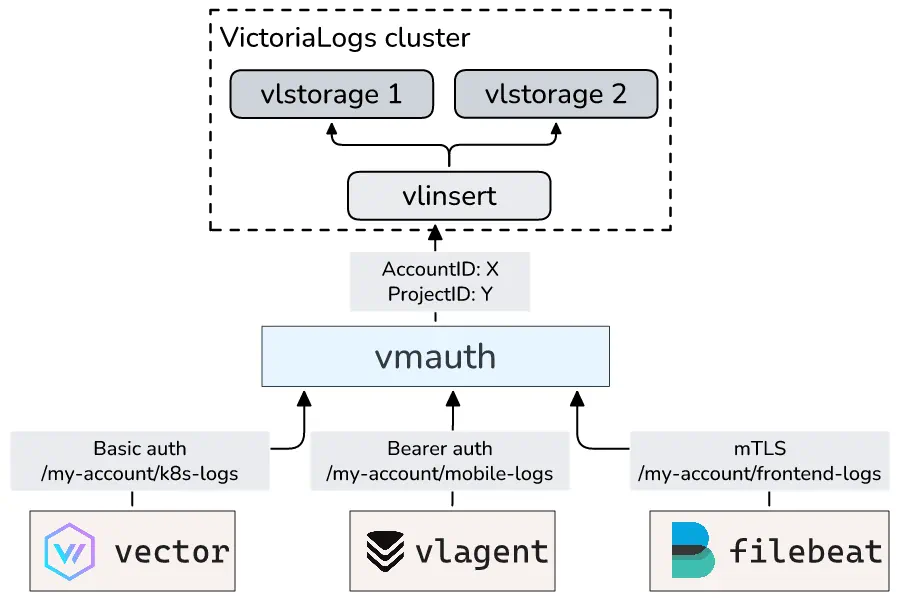
See how to override http request headers before proxying the requests to backends .
Tenant-based proxying of data ingestion requests #
The following vmauth config proxies data ingestion requests with the AccountID: 0 HTTP header
to the long-term VictoriaLogs instance or cluster, while data ingestion requests with the AccountID: 1 HTTP header
are proxied to the short-term VictoriaLogs instance or cluster:
      unauthorized_user:
  url_map:

  # Proxy data ingestion requests for the given tenant (AccountID=0) to long-term VictoriaLogs
  # and override the ProjectID with 0.
  - src_paths: ["/insert/.*"]
    src_headers:
    - "AccountID: 0"
    url_prefix: "http://victoria-logs-longterm:9428/"
    headers:
    - "ProjectID: 0"

  # Proxy data ingestion requests for the given tenant (AccountID=1) to short-term VictoriaLogs
  # and override the AccountID with 0.
  - src_paths: ["/insert/.*"]
    src_headers:
    - "AccountID: 1"
    url_prefix: "http://victoria-logs-shortterm:9428/"
    headers:
    - "AccountID: 0"
This allows building a VictoriaLogs storage system with distinct per-tenant retention configs similar to this one .
See
these docs
on how to setup request routing in vmauth by request headers.
See
these docs
on how to modify request headers before proxying the requests to backends.
See also tenant-based data search request proxying .
Adding extra fields #
You can use the extra_fields parameter in vmauth to automatically add fields to incoming log entries
according to
these docs
.
This is helpful when the writing side cannot include certain metadata, such as the source service name.
The example below adds a service field with the value frontend-logs to all the logs received at the /frontend-logs/insert/* path.
It also includes the _stream_fields parameter as an example of how to configure
stream
for such logs.
      users:
- bearer_token: "foobar"
  url_map:
  - src_paths: ["/frontend-logs/insert/.*"]
    url_prefix:
    - "http://vlinsert-1:9428/?extra_fields=service=frontend-logs&_stream_fields=service"
    - "http://vlinsert-2:9428/?extra_fields=service=frontend-logs&_stream_fields=service"
    # drop /frontend-logs/ path prefix from the original request before proxying it to url_prefix.
    drop_src_path_prefix_parts: 1
Any field sent by the application will be overridden by the value set in the extra_fields.
This prevents the log shipper from unexpectedly overriding the provided extra_fields.
See
these docs
for details.
Basic Auth #
It is recommended to run all the VictoriaLogs components in a secure trusted network, and proxying only the properly authorized requests according to these docs . If you still want exposing individual VictoriaLogs components to untrusted networks such as Internet, then secure access to them via Basic Auth according to the docs below.
All the VictoriaLogs components support request authentication via Basic Auth
for the HTTP requests received at the address specified via -httpListenAddr command-line flag.
Specify the needed username and password via -httpAuth.username and -httpAuth.password command-line flags in order to enable Basic Auth in any VictoriaLogs component.
Important note: HTTP clients send Basic Auth username and password in plaintext, so they could be read by an attacker if the request is transferred over untrusted network such as Internet. Therefore always receive Basic Auth requests over https and never over http. It is recommended to use vmauth for receiving requests over untrusted networks. See how to enable https at vmauth .
Security Warning: Passing passwords directly in command-line arguments is not recommended for production,
as they may appear in process listings (e.g., ps aux)
or debug endpoints (e.g., http://victoria-logs:9428/debug/pprof/cmdline?debug=1).
It is better to provide passwords via files according to these docs .
Providing password from a file #
To read passwords from a file instead of command-line arguments, use the file:// prefix in the corresponding command-line flag:
./victoria-logs -httpAuth.username=vlstorage -httpAuth.password=file:///path/to/file
The value from the file is periodically reloaded, which allows changing the password without restarting the application.
Note: the -httpAuth.username command-line flag does not support reading values from a file.
Example with vlagent sending Basic Auth requests to vmauth :
      ./vlagent \
    -remoteWrite.url=https://vmauth:8427/insert/native \
    -remoteWrite.basicAuth.username=vlagent \
    -remoteWrite.basicAuth.passwordFile=/path/to/file
To test that vlagent is properly configured with Basic Auth, you can send a test log entry
(use the same password value as configured in /path/to/file for -httpAuth.passwordFile):
      curl -u "vlagent:$(cat /path/to/file)" http://localhost:9429/insert/jsonline -H 'Content-Type: application/json' \
    -d '{"_msg":"Hello, VictoriaLogs!"}'
System endpoints #
The following HTTP endpoints at VictoriaLogs components can be protected with keys specified via dedicated -*AuthKey command-line flags.
This may be needed if the corresponding VictoriaLogs components are exposed to untrusted networks.
/metrics- monitoring endpoint for VictoriaLogs components. Use-metricsAuthKeycommand-line flag ./flags- debugging endpoint that shows all active command-line flags. Use-flagsAuthKeycommand-line flag . Note: Passwords are hidden in the output of the/flagsendpoint for security reasons./debug/pprof/*- profiling endpoints for performance analysis. Use-pprofAuthKeycommand-line flag ./internal/log_new_streams- enables logging new log streams during data ingestion. Use-logNewStreamsAuthKeycommand-line flag ./internal/force_flush- forces immediate flushing of in-memory data to disk. Use-forceFlushAuthKeycommand-line flag ./internal/force_merge- triggers manual data compaction and merge operations. Use-forceMergeAuthKeycommand-line flag ./internal/partition/*- manages partition lifecycle operations. Use-partitionManageAuthKeycommand-line flag ./delete/*- deletes the ingested logs. Use-deleteAuthKeycommand-line flag .
These endpoints can be accessed by specifying authKey query arg with the value matching the corresponding -*AuthKey command-line flag.
If the -*AuthKey flag is set, then the endpoint accepts only the authKey and ignores the -httpAuth.* credentials.
Otherwise it is protected with the -httpAuth.* credentials like all the other endpoints.
For example, if VictoriaLogs is started with the -metricsAuthKey=top-secret command-line flag, then the /metrics endpoint can be accessed with the following command:
curl 'http://victoria-logs:9428/metrics?authKey=top-secret'
Enable HTTPS on the VictoriaLogs components which accept authKey in order to prevent from stealing the authKey by attackers
who listen for the requests over untrusted networks such as the Internet.
See
how to enable TLS
.
Unix domain socket #
Pass -httpListenAddr=unix:/path/to/socket command-line flag to VictoriaLogs component in order to accept HTTP requests
over a Unix domain socket instead of a TCP address. This limits access to the component to the processes running on the same host, such as a reverse proxy:
./victoria-logs -httpListenAddr=unix:/run/victoria-logs/victoria-logs.sock
The directory for the socket file must exist and be writable by the VictoriaLogs component,
for example, via RuntimeDirectory=victoria-logs in the systemd unit.
The socket file permissions are determined by the umask
of the process.
With the default systemd umask 0022, only the owner of the socket file can connect to it.
Set UMask=0007 in the systemd unit and add other users to the group of the socket file in order to grant them access.
-httpListenAddr can be specified multiple times in order to accept requests at both TCP addresses and Unix domain sockets.
TLS/SSL #
While all VictoriaLogs components support receiving HTTP requests over TLS (aka HTTPS), this isn’t needed if the components run in the same trusted private network according to the recommendations . Enabling TLS complicates the configuration and slows down communication between components.
If you still want enabling TLS between VictoriaLogs components, then read below.
Enabling TLS on the server #
Pass the following command-line flags to VictoriaLogs component in order to enable receiving HTTPS
requests at the TCP address specified via -httpListenAddr:
-tls- this flag instructs enabling TLS-tlsCertFile- this flag accepts the path to the server TLS certificate file-tlsKeyFile- this flag accepts the path to the key file for the server TLS certificate
For example, the following command starts VictoriaLogs, which accepts HTTPS requests at the default TCP port 9428:
./victoria-logs -tls -tlsCertFile=/path/to/victoria-logs-cert -tlsKeyFile=/path/to/victoria-logs-key
See also how to enable mTLS on any VictoriaLogs component .
Connecting vlagent to VictoriaLogs with TLS #
To send data over TLS, simply change the URL scheme from http to https in the -remoteWrite.url:
./vlagent -remoteWrite.url=https://localhost:9428/insert/native
By default, vlagent verifies server certificates using the system’s trusted certificate store. If using self-signed certificates, you have the following options:
- Install your CA certificate in the system’s trusted certificate store.
- Specify the CA certificate path manually using
-remoteWrite.tlsCAFile.
For testing purposes only, you can disable certificate verification with -remoteWrite.tlsInsecureSkipVerify.
Security Warning: Disabling certificate verification eliminates protection against man-in-the-middle attacks. Never use this in production.
Automatic issuing of TLS certificates #
All the
VictoriaLogs Enterprise
components support automatic issuing of TLS certificates
for public HTTPS server running at -httpListenAddr via Let’s Encrypt service
.
The following command-line flags must be set in order to enable automatic issuing of TLS certificates:
-httpListenAddrmust be set for listening TCP port443. For example,-httpListenAddr=:443. This port must be accessible by the Let’s Encrypt service .-tlsmust be set in order to accept HTTPS requests at-httpListenAddr. Note that-tlsCertFileand-tlsKeyFilearen’t needed when automatic TLS certificate issuing is enabled.-tlsAutocertHostsmust be set to comma-separated list of hosts, which can be reached via-httpListenAddr. TLS certificates are automatically issued for these hosts.-tlsAutocertEmailmust be set to contact email for the issued TLS certificates.-tlsAutocertCacheDirmay be set to the directory path for persisting the issued TLS certificates between VictoriaLogs restarts. If this flag isn’t set, then TLS certificates are re-issued on every restart.
Example of starting VictoriaLogs with automatic TLS certificate issuing:
      ./victoria-logs -httpListenAddr=:443 \
    -tls \
    -tlsAutocertHosts=victorialogs.example.com,logs.example.com \
    -tlsAutocertEmail=admin@example.com \
    -tlsAutocertCacheDir=/path/to/tls-cache \
    -licenseFile=/path/to/license
mTLS #
This feature requires Enterprise binaries for VictoriaLogs components that use mTLS.
Mutual TLS (mTLS ) requires both client and server to present valid certificates for authentication. Unlike standard TLS where only the server authenticates itself, mTLS enables bidirectional authentication.
Enabling mTLS on the server #
mTLS requires both
standard TLS command-line flags for server
and additional -mtls command-line flag:
      ./victoria-logs -tls \
    -tlsCertFile=./victoria-logs.pem \
    -tlsKeyFile=./victoria-logs-key.pem \
    -mtls \
    -licenseFile=/path/to/license
By default, VictoriaLogs verifies client certificates using the system’s trusted certificate store. If using certificates signed by a private CA not present in the system trust store, you have two options:
- Install your CA certificate in the system’s trusted certificate store.
- Specify the CA certificate path manually using
-mtlsCAFilecommand-line flag.
Connecting vlagent to VictoriaLogs with mTLS #
Specify -remoteWrite.tlsCertFile and -remoteWrite.tlsKeyFile command-line flags for the corresponding -remoteWrite.url
which requires mTLS. Optionally, specify -remoteWrite.tlsCAFile:
      ./vlagent -remoteWrite.url=https://vlinsert:9428/insert/native \
    -remoteWrite.tlsCAFile=/path/to/server-ca.pem \
    -remoteWrite.tlsCertFile=/path/to/client-cert.pem \
    -remoteWrite.tlsKeyFile=/path/to/client-key.pem
Certificate reloading #
VictoriaLogs automatically re-reads TLS certificate files (server certificates, client certificates, and CA certificates) without requiring server or client restarts. Certificate and TLS config values are cached for up to 1 second and then refreshed for new handshakes/requests, which enables seamless certificate rotation in production environments.
The certificate reloading feature works for:
- Server certificates (
-tlsCertFileand-tlsKeyFile). - Client certificates (
-storageNode.tlsCertFile,-storageNode.tlsKeyFile,-remoteWrite.tlsCertFile,-remoteWrite.tlsKeyFile). - CA certificates (
-mtlsCAFile,-storageNode.tlsCAFile,-remoteWrite.tlsCAFile).
To update certificates:
- Replace the certificate files on disk with new versions.
- VictoriaLogs will automatically detect and load the updated certificates.
- New connections will use the updated certificates immediately.
- Existing connections will continue using the old certificates until they reconnect.