Multitenancy allows a single VictoriaStack installation to store data for many isolated data groups, such as teams, environments, or customers. Each group is a tenant, and every tenant sees only its own metrics, logs, and traces.
VictoriaMetrics, VictoriaLogs, and VictoriaTraces share the same tenant model, and a request selects its tenant with HTTP headers. This page explains the model, then how the tenant is selected when data is written or read.
VictoriaMetrics supports multitenancy only in cluster mode . The rest of this page assumes VictoriaMetrics runs in cluster mode.
The tenant model #
A tenant is identified by an (AccountID, ProjectID) pair. Both are arbitrary 32-bit unsigned integers in the
range [0 .. 2^32). AccountID groups a top-level owner such as a team, while ProjectID is optional and divides
an account into sub-groups.
The same rules apply to all three databases:
- Tenants isolate data. A query against one tenant never returns data from another tenant.
- Tenants are created on first write. Writing the first data point to
AccountID: 42creates that tenant. - Overhead is low. It is OK to have thousands of tenants. Resource usage depends on the total number of active time series, log streams, and spans, not on the number of tenants.
- Default tenant is
0:0. A request that specifies no tenant automatically usesAccountID: 0, ProjectID: 0. - Tenant IDs are numeric. Map human-readable names to tenant IDs in the authorization layer in front of the stack, such as vmauth.
See how to control per-tenant access via vmauth .
Ingestion path #
Every write request selects its tenant with the AccountID and ProjectID HTTP headers. The following request writes
metrics to AccountID: 42 and ProjectID: 0:
      curl -X POST http://<vmstack>:8427/metrics/insert/prometheus/api/v1/import/prometheus \
 -d 'up{instance="foo"} 123' \
 --header "AccountID: 42" \
 --header "ProjectID: 0"
Once the request completes, tenant AccountID: 42, ProjectID: 0 is created automatically and populated with the supplied
metrics. Logs and traces work the same way, only the endpoint differs:
      curl -X POST http://<vmstack>:8427/logs/insert/jsonline \
 -d '{"_msg":"cannot open file","_time":"0"}' \
 --header "AccountID: 42" \
 --header "ProjectID: 0"
In practice the headers are set once in the agent or collector that delivers the data. For example, set tenant in OpenTelemetry Collector exporter configuration:
      exporters:
  otlp_http/vlogs:
    logs_endpoint: http://vmstack:8427/logs/insert/opentelemetry/v1/logs
    headers: { AccountID: "42", ProjectID: "0" }
Query path #
Reads select the tenant with the same two headers, so a query returns data of one tenant only:
      curl 'http://<vmstack>:8427/metrics/select/prometheus/api/v1/query' \
 -d 'query=up' \
 --header "AccountID: 42" \
 --header "ProjectID: 0"
      curl 'http://<vmstack>:8427/logs/select/logsql/query' \
 -d 'query=error' \
 --header "AccountID: 42" \
 --header "ProjectID: 0"
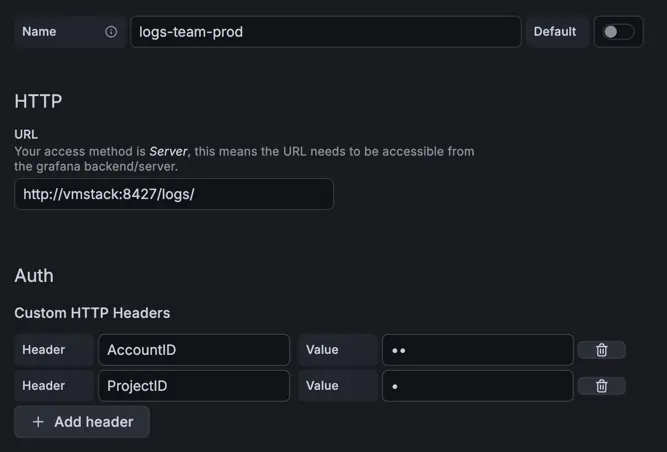
Grafana sends the headers per datasource, so one datasource serves one tenant. Set them directly in the datasource settings:
Or let vmauth derive the tenant from the credentials, so the datasource only carries a username and password:
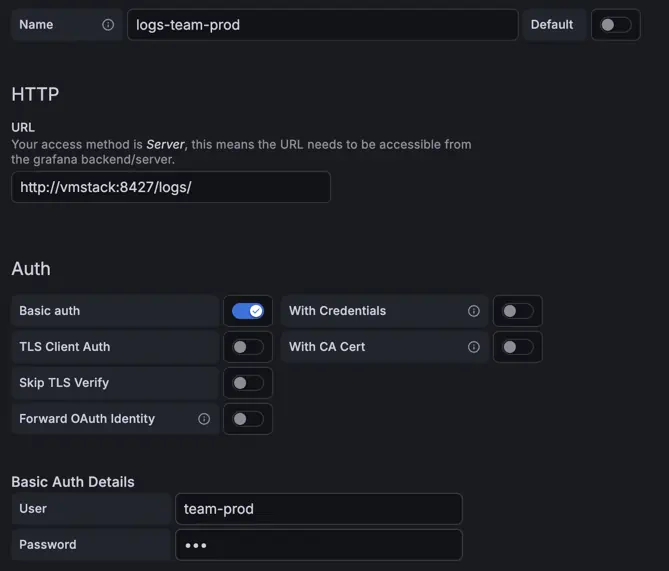
The second option is the safer one: clients cannot pick a tenant themselves, and revoking a credential revokes the access. See Access control for the vmauth configuration, and for restricting a user to a subset of data within a tenant .
Querying multiple tenants #
VictoriaLogs and VictoriaTraces do not support querying multiple tenants within one request. Follow this issue for adding support of this feature.
VictoriaMetrics supports querying multiple tenants in a single request when using header AccountID: multitenant:
      curl 'http://<vmstack>:8427/metrics/select/prometheus/api/v1/query' \
 -d 'query=up' \
 --header "AccountID: multitenant"
The return result will contain vm_account_id and vm_project_id labels, so it stays visible which tenant every series
came from.
Multitenant queries are usually slower than requests to a single tenant. Use multitenant queries only when a cross-tenant view is really needed.
Per-tenant retention #
By default,
retention
applies to all data in an
installation. VictoriaMetrics can also keep different retentions per tenant
via
retention filters
,
which are part of the
Enterprise
package. Pass the filters to
vmstorage nodes:
      # data for tenant AccountID=42 will be kept for 6 months, all the rest will be kept for 12 months
-retentionFilter='{vm_account_id="42"}:6M' -retentionPeriod=12M
Tenants that match no filter use the global -retentionPeriod.
Discovering tenants #
There are following endpoints for discovering existing tenants:
- Metrics:
http://<vmselect>:8481/admin/tenants?start=<start>&end=<end> - Logs:
http://<victorialogs>:9428/select/tenant_ids?start=<start>&end=<end>returns the tenants that received logs in the given time range. - Traces:
http://<victoriatraces>:10428/select/tenant_ids?start=<start>&end=<end>returns the tenants that received spans in the given time range.
If params <start> and <end> are specified, API returns the tenants that received data in the given time range.
See the supported
timestamp formats
.
If omitted, all tenants that ever received data are returned.